Setup Architectures
On this page you will learn about some of the ways you can setup a Cluster and connect it to your Assets.
Under the hood, a Cluster in Kelvin is a Kubernetes cluster with a number of Kelvin pods deployed running specialized software to run all the Kelvin edge services on the Kubernetes Cluster and also provide fault tolerant communications to your Assets and to the Cloud.
The Cluster is a very flexible and easily scalable edge solution that can be setup to run in many different IT environments, even to locations with unreliable or limited Internet connections.
You can use a Cluster for many types of operations and for many reasons. Some operations and reasons could be;
- Collect data from your Assets and send them to the Cloud
- Control and update your Asset's data, for example machinery setpoints, using fault tolerant read/writes to Assets.
- Run any type of Python program
- Run machine learning (AI) programs to analyze data and produce actions
- Scale your edge processing capabilities without affecting your current operations
- Run an edge program with local Asset's connected without Internet (need Internet to setup and occasionally for data transfer back to Cloud)
- Deploy your program many times to run on different Asset in the same or multiple locations
- Use a Cluster in the Cloud for easy program deployment, management of programs to communicate with IIoT (Industrial Internet of Things) Assets or Internet connected Assets. And easily scale processing power without interrupting current operations as required.
- ... and many more scenarios
Hardware Specific Assets
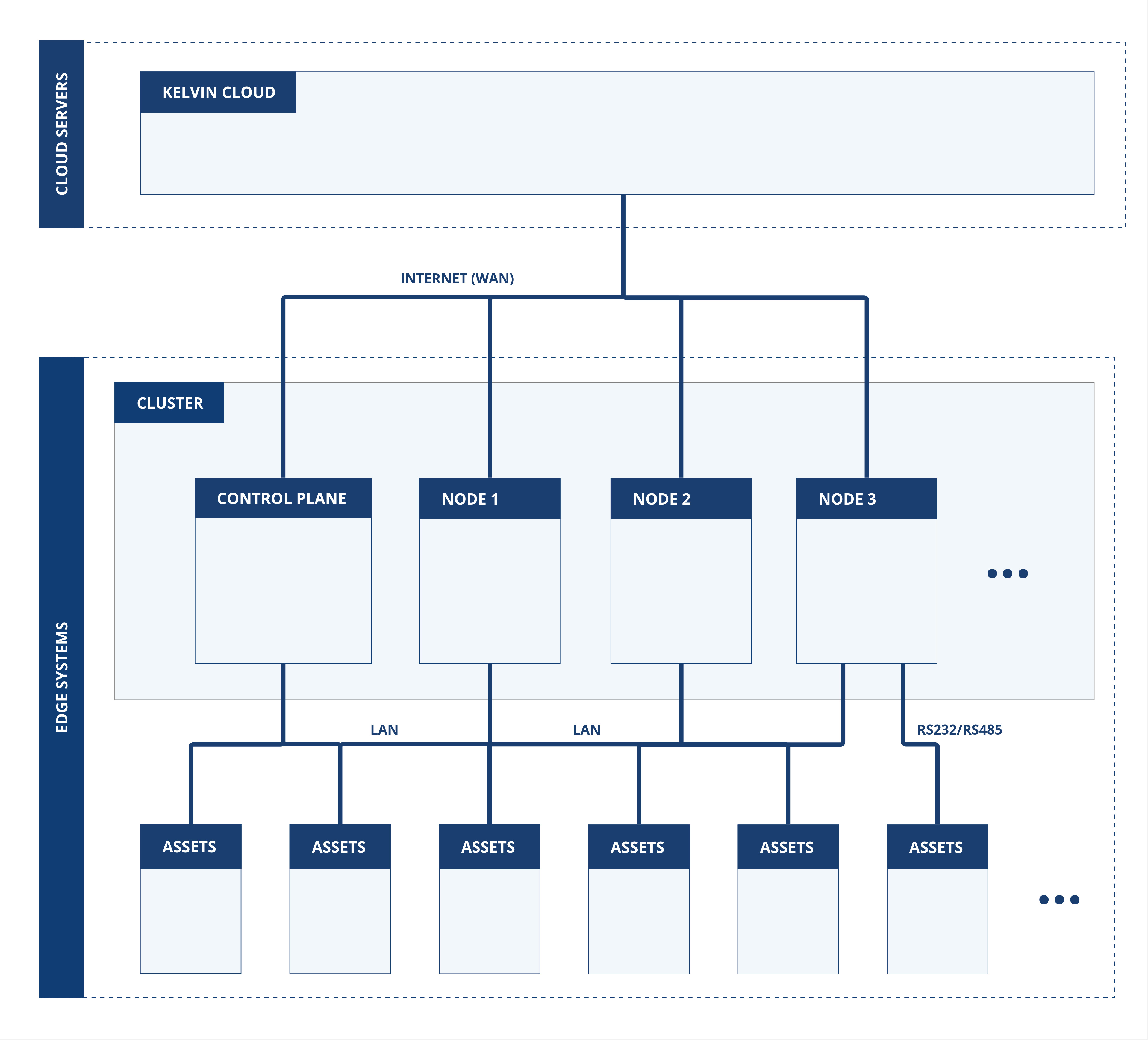
For Assets that are connected directly to a specific computer hardware, then any deployments of Connections for that Asset must run on the this hardware. For example older Assets that use an RS485/RS232 communications from your assets to the Node like a PLC with a serial Modbus communications module.
You will need to ensure your program is deployed to the specific Node in a Cluster. If not specified, then the Cluster will automatically assign a random Node to run your Connection and programs.
Currently Kelvin does not support Node specific deployments. To achieve hardware specific deployments, you can create a single node cluster. You can communicate between local Clusters without requiring a connection to the Cloud, so you can still scale as required at the edge with this solution.
Connect to Assets with LAN or Serial Connections
In a standard LAN setup you can connect all your assets and all the Nodes in a Cluster to the LAN connection.
Remember that if you have Assets that are communicating directly to specific computer hardware, then you must setup a single Node Cluster to guarantee deployment to the correct hardware. Check out the earlier chapter on Hardware Specific Assets.
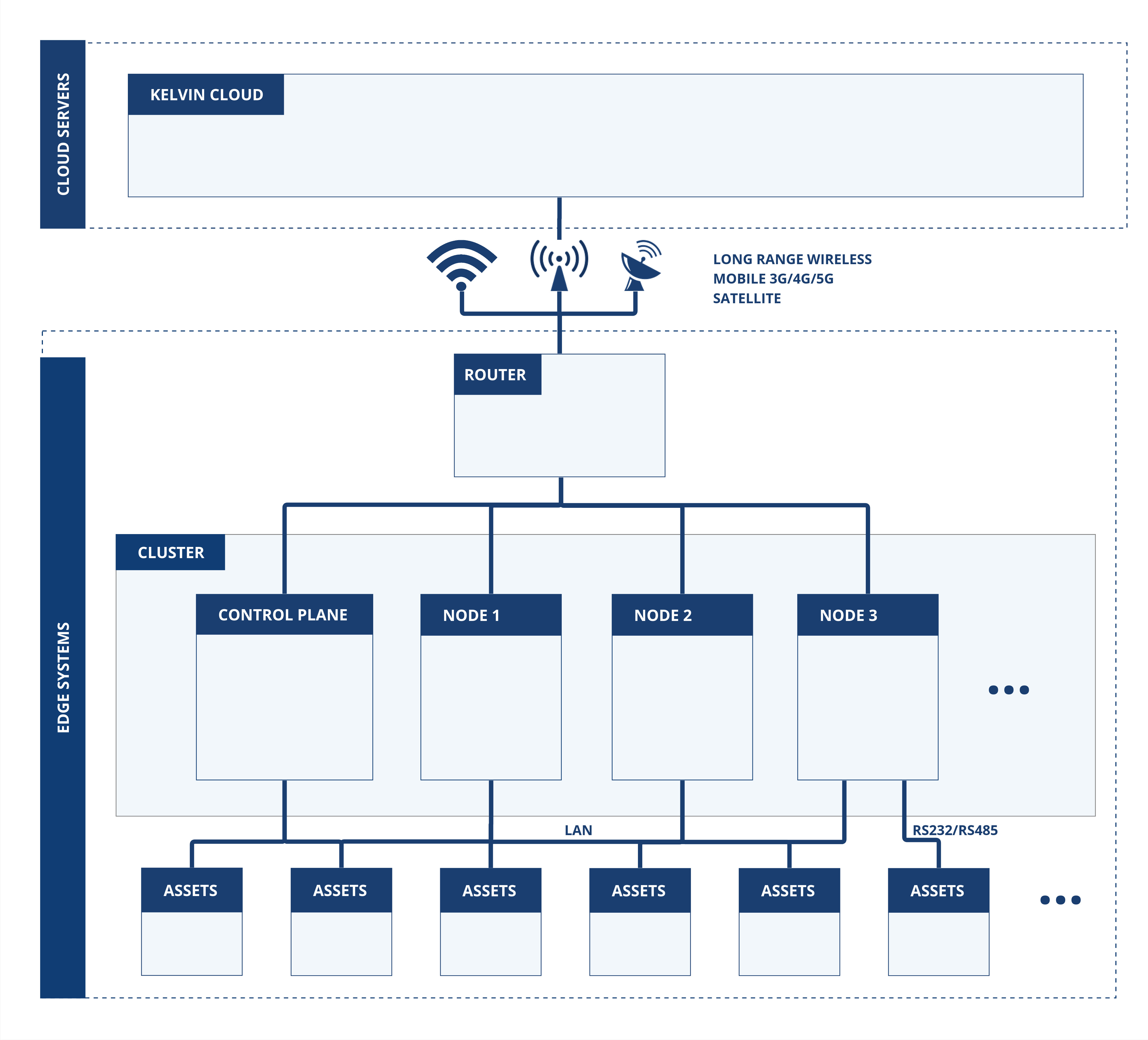
Remote Assets using Wireless Technologies
If your assets are in a remote location, it is common to connect you assets to your Cluster computers in a LAN configuration, then directly to a mobile network on 4G, 5G, 6G or satellite (like Starlink) to the Cloud.
Kelvin's edge systems are fault tolerant and slow or intermittent Internet will not cause any loss of data. All data collected at the edge will be automatically stored locally until it can be transferred to the Cloud.
Likewise any Cloud operations like Control Change, program deployments or program/core upgrades will be queued in the Cloud until the Edge Cluster comes back online where the queued actions will then be automatically sent.
Remember that if you have Assets that are communicating directly to specific computer hardware, then you must setup a single Node Cluster to guarantee deployment to the correct hardware. Check out the earlier chapter on Hardware Specific Assets.
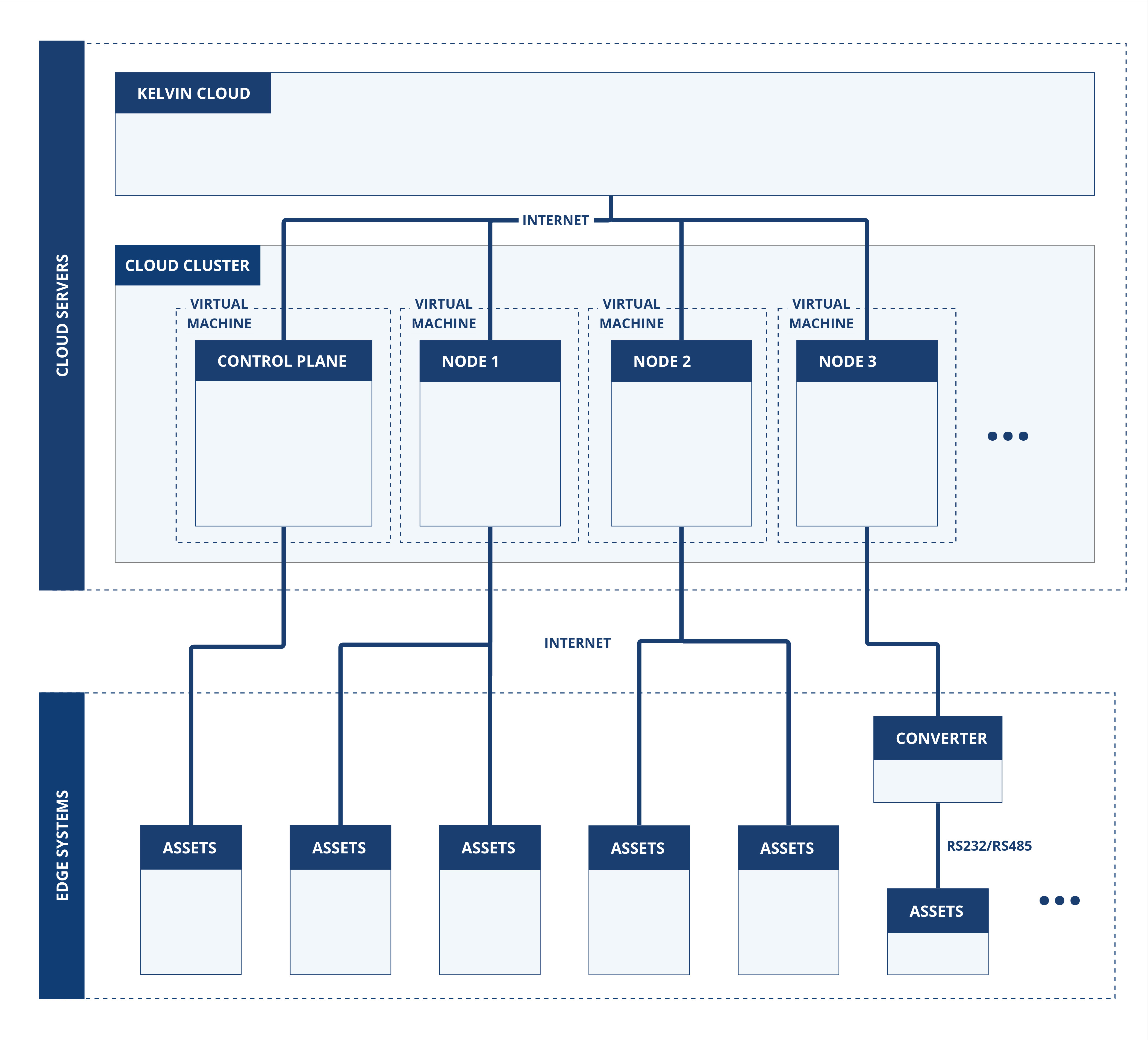
Cloud Based Clusters
You can even install Clusters and Nodes in VMs on a persistent PaaS. This can be useful if you want to centralize some common Application or Connectors where you need guaranteed uptimes.
Technically the communication to your assets will need to be Ethernet compliant such as OPC-UA, MQTT or Modbus-TCP. In this scenario your assets should also have the appropriate security and encryption precautions to protect again malicious entry or eavesdropping.