Skip to content

Clusters and Nodes

On this page you will learn about what is a Cluster and a Node and how they fit into Kelvin.

What is a Cluster ?

A Cluster is a Kubernetes cluster.

The Kubernetes Cluster can be created by you or by Kelvin. This has to be decided before you setup your edge cluster.

If you are not familiar with Kubernetes clusters or do not want the hassle of managing a Kubernetes cluster, then you can leave everything to Kelvin. You only need to provide a bare metal OS installation with a basic Linux server OS (like Ubuntu Server).

What is a Node ?

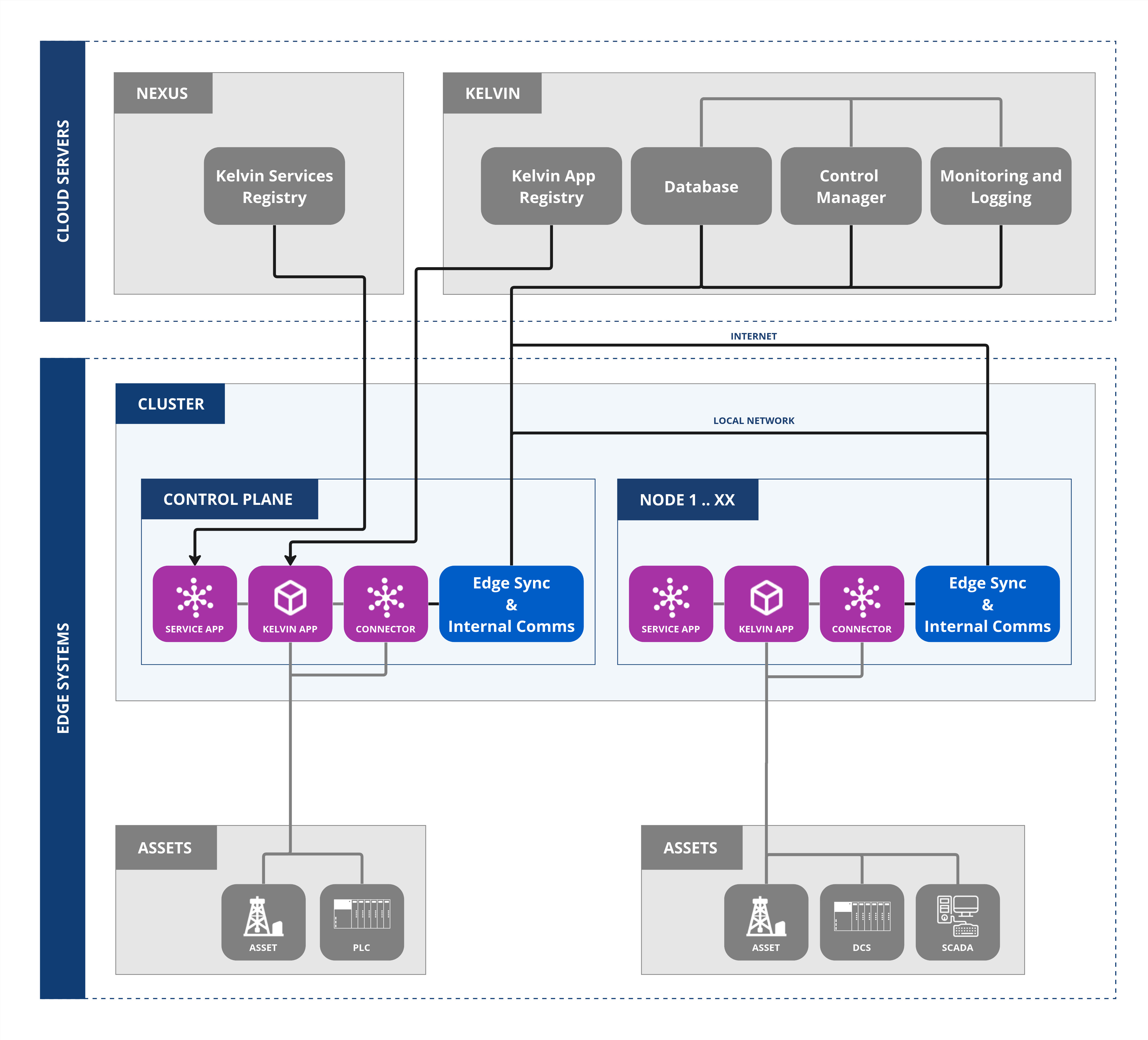
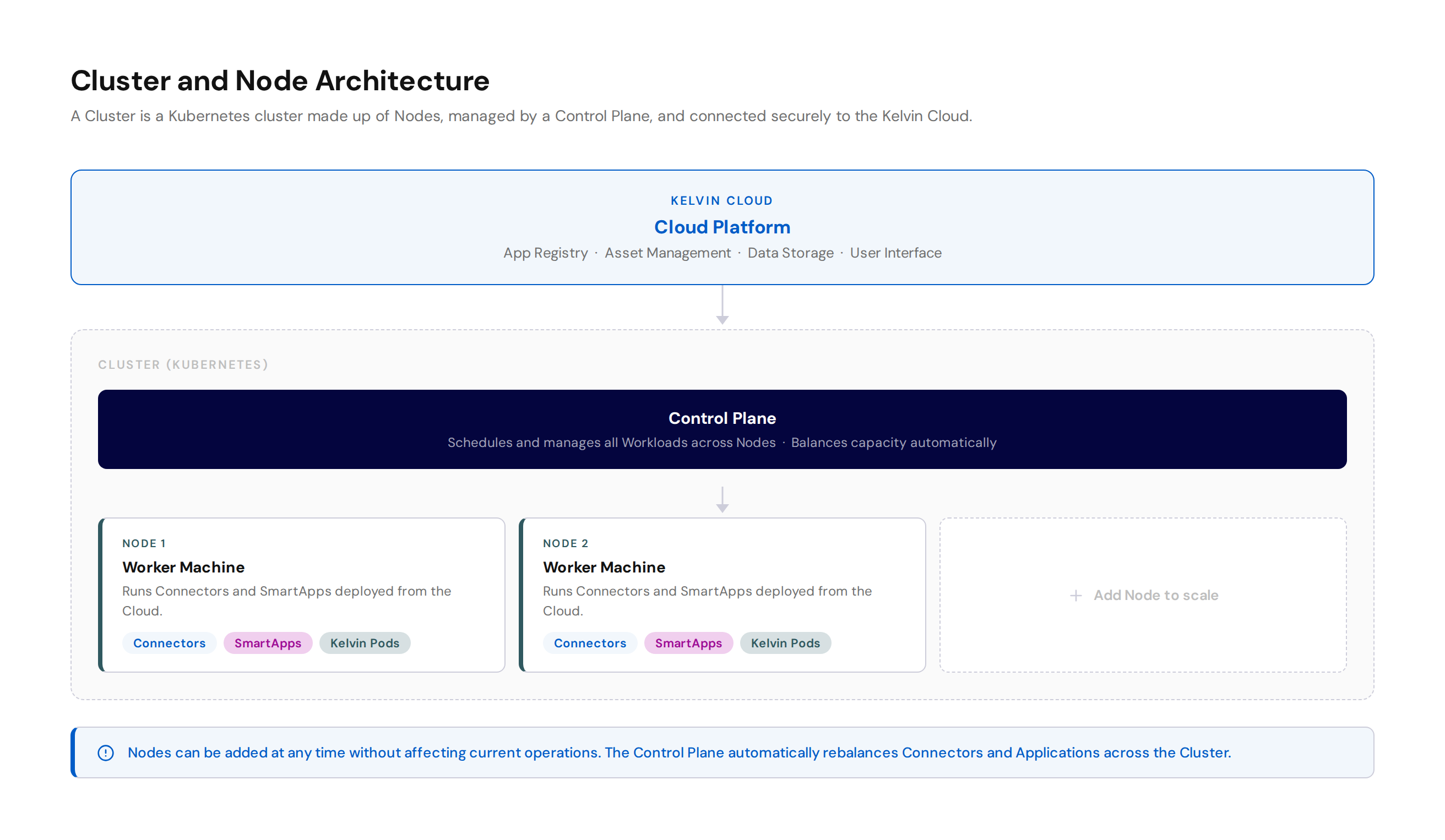
A Node is a worker machine in a Kubernetes cluster. A Cluster can have many nodes all of which will be controlled by a Control Plane.

It is recommended that you have only one Node on each physical computer or server.

The Control Plane will decide which Nodes will run each Workload deployed. New Nodes can be added at any time to scale the capacity of any Cluster without affecting current operations. The main criteria is that they are all located in the same network and are controlled from one Control Plane.

The advantage of this is that as you requirements grow at the edge, you can easily scale up capacity for running Connectors and Workloads at the edge without affecting existing hardware and software.

All Nodes will have custom pods developed by Kelvin installed which handle the specialized tasks between the edge and the Cloud. All the Kelvin operations are all performed in the background and transparently.

In general the Nodes perform two functions;

  • It is your gateway from your local installations where your assets are to the Cloud.
  • You can run your Kelvin SmartApp™ at the edge close to your assets, even without Internet connection, and manage them from a central location.

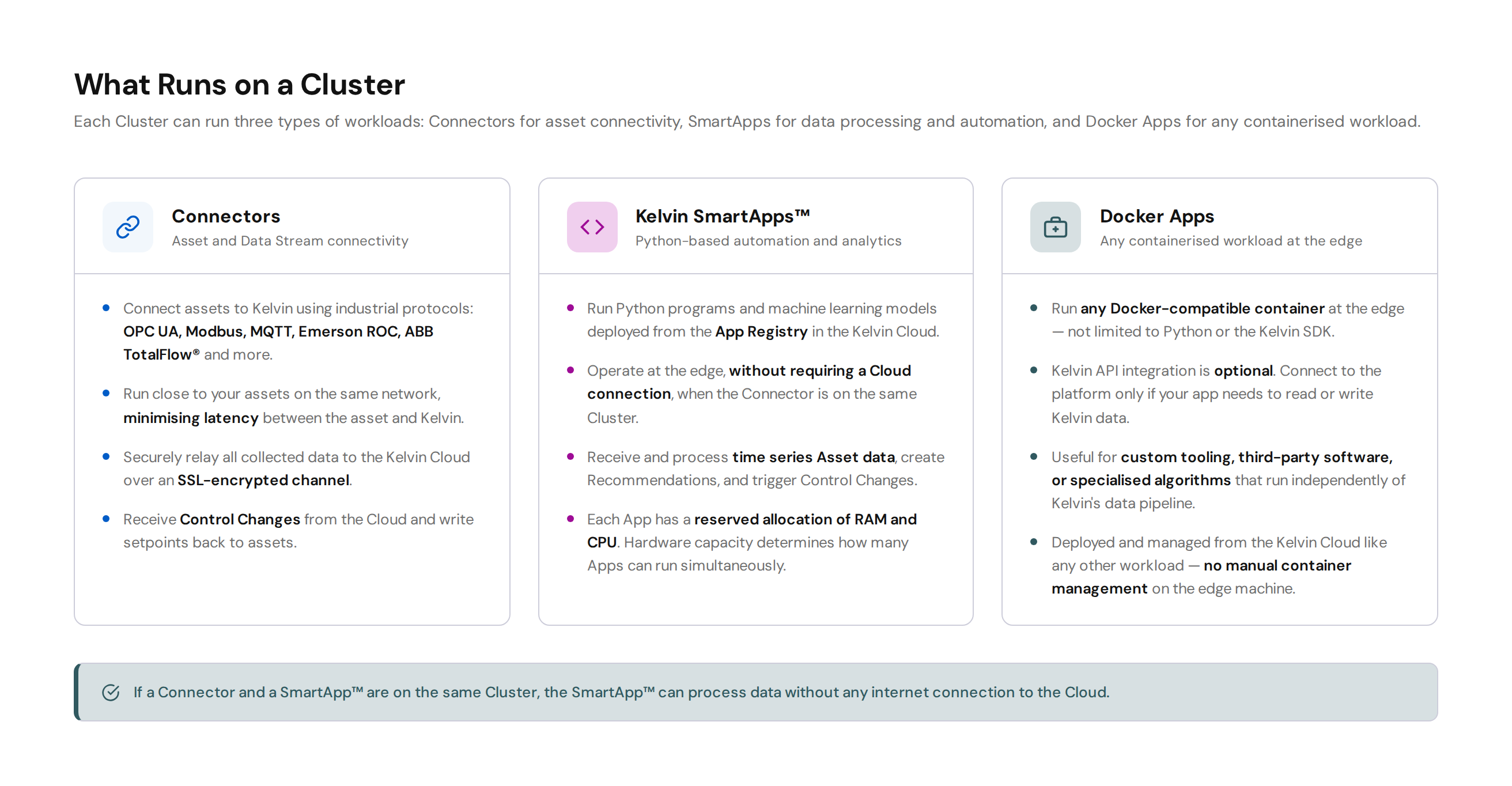
For example if your Connector collecting Asset / Data Stream pair data from your assets is on the same Cluster as your Kelvin SmartApp™ processing the data, then it is not necessary to have a connection to the Cloud for Kelvin SmartApps™ to run.

A Node will handle all the secure communications to the Cloud. It also manages all the Workloads and Kelvin SmartApps™ that are deployed from the Cloud to run on the hardware where the Node is installed.

The main limitation of what you can run on the edge is the hardware specifications. When doing your infrastructure planning, make sure you invest in the right hardware for your needs.

Running Apps that communicate to multiple Assets or running Machine Learning algorithms will require more powerful hardware specifications.

Running many Apps will require more RAM as each App will have a reserved minimum amount of RAM and CPU resources.

What is Scaling ?

Scaling a Cluster means that you can add Nodes to a Cluster when you need to increase you processing capacity and delete Nodes from a Cluster when you want to save costs.

This can be done on demand without affecting your current operations. Kelvin and Kubernetes will ensure the scaling is done transparently and will move the Connections and Applications to balance the Cluster's operations.

What can you do on a Cluster ?

In Kelvin, there are two main features for Clusters;

  1. Run Connectors which is Kelvin specific pods that will connect your Assets to the Cloud via a range of Industrial communication protocols.
  2. Run Python programs and machine learning models from a cloud program storage that can do anything that Python can do.

The Kelvin API Client (Python) allows you to write programs that will connect directly into all the API features in Kelvin. Some of the more common API features used are;

  • Receive or Send Asset data.
  • Process complete chunks of time series data
  • Use the cloud database for custom calculated measurement data streams.
  • Create Control Changes for Asset (Control Changes provide a fault tolerant way to ensure Assets receive and process the data changes).
  • Create Recommendations for Kelvin UI users.
  • Manage all your Applications. For example, you can could automate deploy, delete, start, stop or upgrade your Applications.
  • Manage all your Assets, Data Streams and the Asset / Data Stream pairs.
  • Manage your Clusters. This can allow you to automate monitoring, deploy, delete and scaling of your Clusters and Nodes.

Kubernetes Cluster Options

Clusters can be installed either on a bare metal OS machine or on a pre-existing Kubernetes cluster.

You can use any type of Kubernetes cluster as long as it conforms to the Kubernetes Conformance Program, overseen by the Cloud Native Computing Foundation (CNCF).

Some common Kubernetes providers are;

  • k3s, kubernetes, minikube, etc. for self hosting
  • EKS Clusters provided by Amazon
  • AKS Clusters provided by Azure
  • GKE Clusters provided by Google

Bare Metal OS Machine

If you don't want to have any headaches managing a Kubernetes cluster, then you can continue to work with Kelvin in the traditional sense and just setup a machine with Ubuntu Server installed.

Then run an install script which will automatically download and install all necessary libraries and setup the Kubernetes (k3s) cluster.

In this setup, each computer will be a separate cluster with one node only. If you want to have multiple nodes in on cluster, then you will need to setup your own Kubernetes cluster.

Kubernetes Cluster

If you have your own cluster already or you want to setup a new cluster to leverage more advanced features, you can install the Kelvin infrastructure inside your own cluster.

You will need to manage the Kubernetes cluster yourself. You will have a number of analytics available in Kelvin and will also be able to conveniently manage the Kelvin infrastructure upgrade options.

For this option you will download a yaml configuration file from Kelvin, then run a kubectl command to configure and setup Kelvin on the cluster.

Cluster Security

All the custom Kelvin pods is installed on each Node in a Kuberetes Cluster.

If you let Kelvin manage the Kubernetes Cluster and then Kelvin will manage the security of the Kubernetes cluster and the Kelvin pods. You do have control on when and how these are upgraded to ensure it does not affect your operations.

You still need to ensure you follow standard procedures in securing your OS, maintaining the latest OS software security patches and having an appropriate firewall install and active.

If you are using your own Kubernetes Cluster locally or on the Cloud, for example K3s, AKS or EKS, then we recommend you follow the distribution's security recommendations.

Firewalls

If you have selected to let Kelvin setup the cluster, then check the K3S documentation on what firewall settings are recommended. You can read these requirements here, https://docs.k3s.io/installation/requirements#networking.

If you manage your own Kubernetes Cluster, then you will need to check the documentation from the provider of the Kubernetes cluster you have chosen.

Cluster Communications

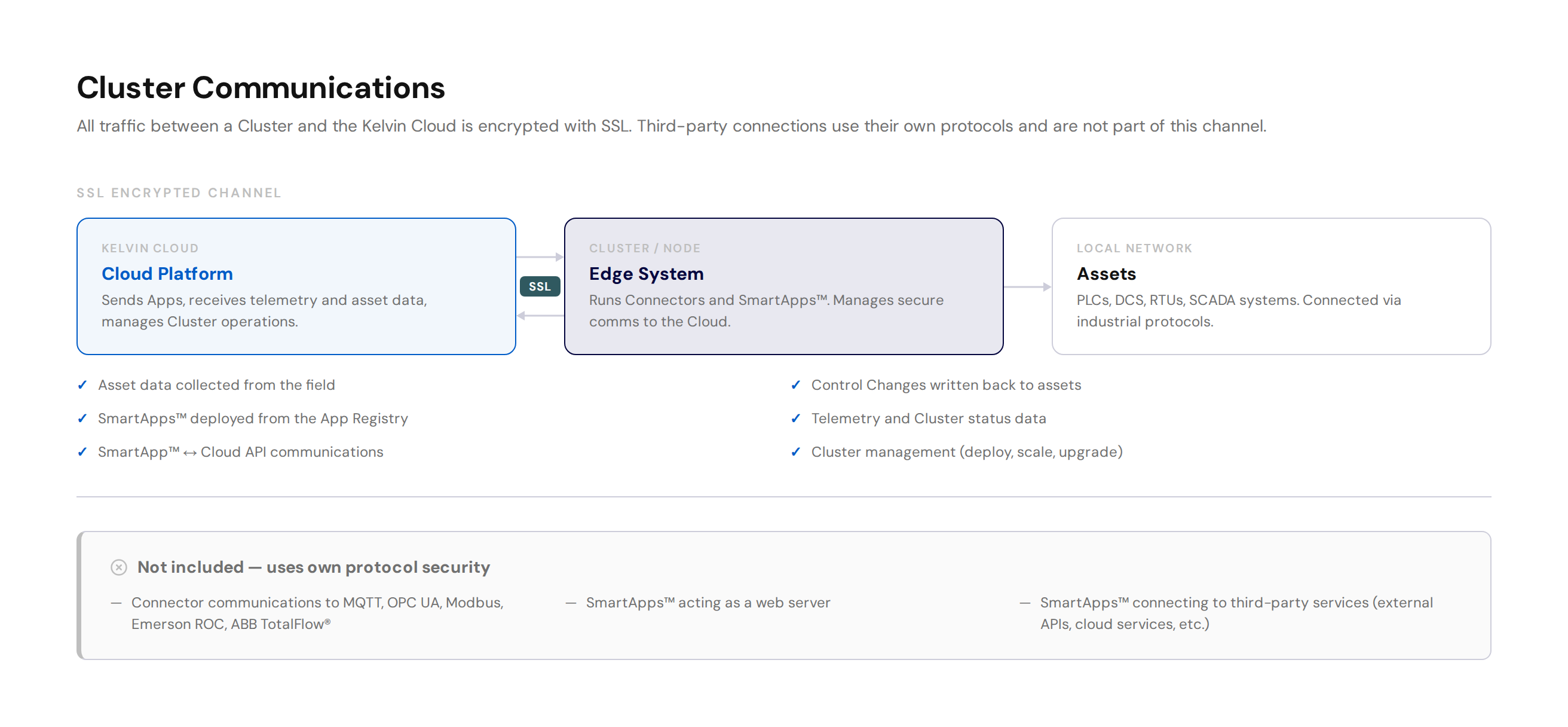
Cluster communications uses the state of the art SSL encryption technology to securely transmit all information between the Cluster / Nodes and the Cloud.

Everything goes through this communication layer. For example;

  • All data collected from the assets
  • All data to be written to the assets
  • All Apps to be deployed to the Cluster
  • All telemetry data
  • Any status communications between Kelvin SmartApp™ and the Cloud

This does NOT include any Kelvin SmartApp™ that connects to third party devices. For example;

  • Connector communications to MQTT, Emerson ROC, OPC UA, Modbus or ABB TotalFlow® Servers. This relies on the local encryption and security protocols of the local servers.
  • Kelvin SmartApp™ that act as a web server
  • Kelvin SmartApp™ that connects to third party servers such as external websites, third party cloud communications services, etc.