Data Stream
What is a Data Stream?
A Data Stream is a single piece of data being recorded from either an Asset or calculated from Applications. It is stored in the time series database in the Kelvin API.
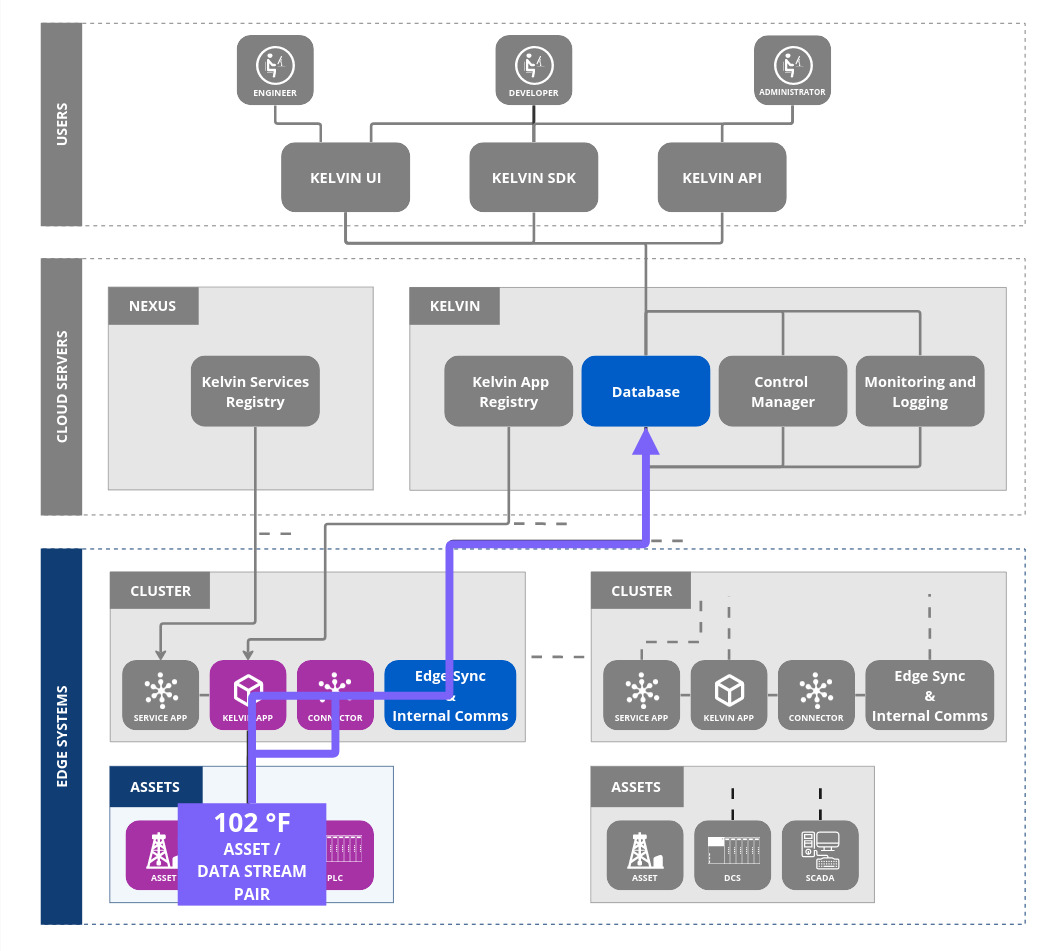
Usually one Asset will have multiple data streams being recorded.
When setting up your Data Streams, it is important you plan your naming strategy properly before starting, to ensure you can easily filter and find your wanted data quickly.
Data Stream and Assets
You can get a good overview of Asset / Data Stream pair concept in this introduction video;
A Data Stream is linked to one or more Assets, signifying the flow of specific metric data related to that asset. Together, they provide a continuous or periodic record of key parameters indicative of an asset's performance, health, or status.
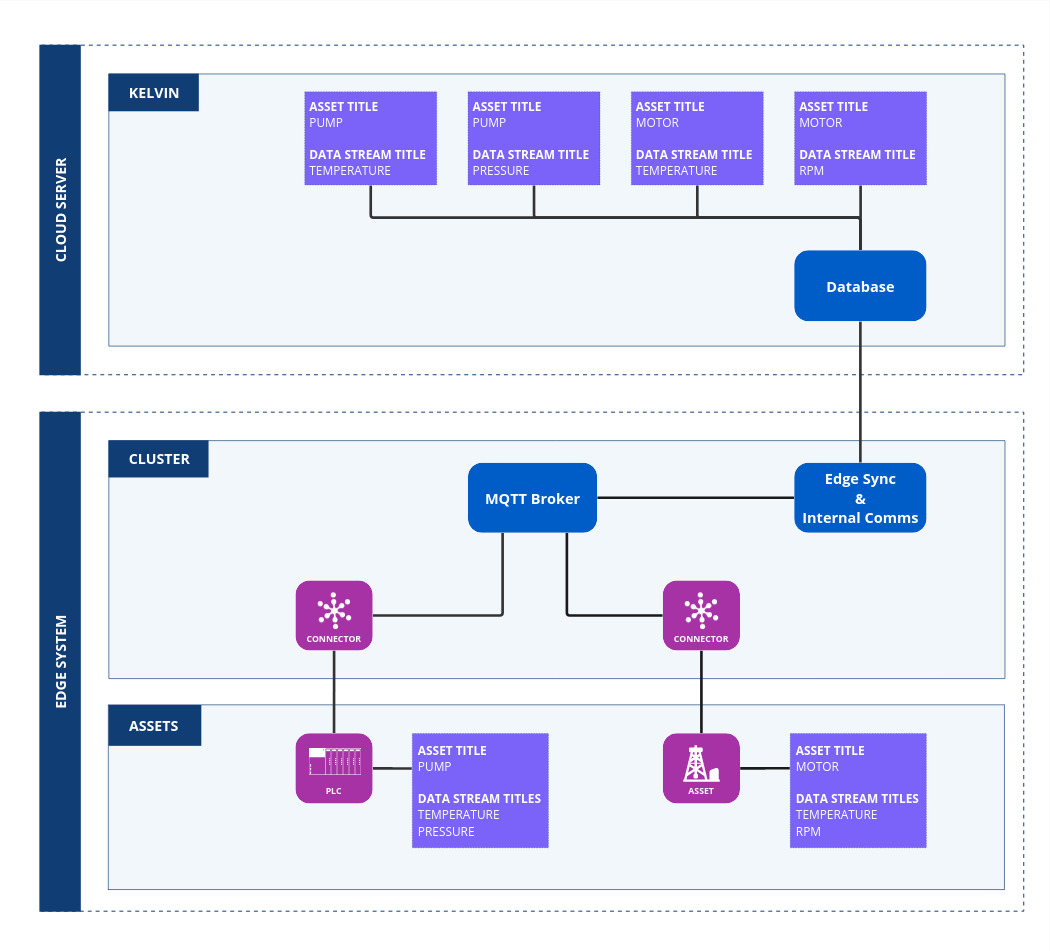
For example:
- Pump (Asset):
- Temperature (Data Stream): This stream monitors the operating temperature of the pump, capturing data in real-time or at set intervals.
- Pressure (Data Stream): This stream measures the pressure of the fluid being pumped, again possibly in real-time or at defined intervals.
- Motor (Asset):
- Temperature (Data Stream): Monitors the operating temperature of the motor.
- Speed (Data Stream): Captures data on the RPM speed at which the motor is running.
- Production Process (Virtual Asset):
- Efficiency (Data Stream): This could be a virtual data stream that calculates efficiency by combining real-time data from multiple sensors or devices on a production line.
Every piece of data that is recorded is specifically associated with an Asset and a Data Stream. This pair ensures that there's a clear traceability and context for each data point.
For example, if a temperature reading of 75°C is recorded at a certain timestamp, it would be associated with a specific motor (Asset) and its temperature monitoring (Data Stream). This provides clarity on what the data represents and where it originated.
By defining data collection in terms of Assets and Data Streams, organizations can achieve a structured and organized approach to monitoring and analyzing their industrial environments, whether dealing with physical machinery or virtual representations of processes. It ensures that data is not only collected but is meaningful, contextual, and can be used for informed decision-making, predictive maintenance, and other data-driven applications.
Reference
| Field | Description |
|---|---|
| Name | Unique name identifier. It must contain only lowercase alphanumeric characters. The characters ., _ and - are allowed to separate words instead of a space BUT can not be at the beginning or end of the name. |
| Title | The display name to show on the Kelvin UI. It can contain any characters, including spaces. |
| Type | Determines if the data is directly derived from sensors or is processed/calculated. Allowed values: Measurement, Computed, Setpoint or Data Quality. |
| Semantic Type | Provides context or deeper meaning behind the data, beyond just its format or structure. Check Kelvin API for the full list of available semantic types. |
| Data Type | Specifies the kind of data in the stream. Allowed values: Boolean, Number, Object, String. |
| Unit | Defines the measurement unit for data. Check Kelvin API for the full list of available units. |
| Description | Optional description for the data stream, up to 200 characters. |
Name
The unique name of the data stream. It must contain only lowercase alphanumeric characters.
The characters ., _ and - are allowed to separate words instead of a space BUT can not be at the beginning or end of the name.
The maximum length is 64 characters.
Title
The display name of the data stream. It can contain any characters, including spaces.
This is used to identify the data stream in the Kelvin UI.
The maximum length is 64 characters.
Type
There are four types of data streams:
- Measurement: A measurement is a numerical value assigned to a physical property or phenomenon, such as temperature, pressure, or flow rate. Measurements are collected by sensors or instruments. There is no difference with Setpoint but allows differentiation when creating Connections where you want to know which Data Streams to assign Read Only permissions.
- Computed: A computed value is assigned to calculations and workload outputs. This can be in the form of a KPI.
- Setpoint: A setpoint is a value that can be changed by a user or an application and affects the operation of a piece of equipment. There is no difference with Measurement but allows differentiation when creating Connections where you want to know which Data Streams to assign Write permissions.
- Data Quality: A data quality metric contains information about the outliers, frequency, gaps or other features of the data, and is required for proper operation of applications.
Semantic Type
A semantic type for a data stream pertains to the deeper meaning or context behind the data being transmitted or processed. Unlike syntactic types, which primarily concern the format or structure of data (e.g., number, string, boolean), semantic types give insights into the nature, purpose, or origin of the data.
For instance, in an industrial setting, a data stream might be syntactically classified as a series of floating-point numbers. However, its semantic type could further define it as "Temperature" or "Pressure".
You can see a full list of Semantic Types in the Platform Administration under Data Streams here.
Data Type
It's essential to choose the appropriate Data Type that matches the kind of data you expect to receive.
Some Semantic Types are predefined and will automatically determine the Data Type for you. For instance, if you choose "Pressure" as the semantic type, the system will automatically set the data type to Number. In contrast, the "State" semantic type offers more flexibility and can be a Boolean, Number, or String. In such cases, you'll need to manually select the correct Data Type.
Below are the available primitive data types with brief descriptions and their respective ranges:
| Option | Declaration Name | Description |
|---|---|---|
| Boolean | boolean |
Represents a binary state, either True or False |
| Number | number |
Uses a double precision floating point format. |
| String | string |
Variable-length text. |
| Object | Any word | This is unique because the word object is not explicitly used. Instead, an object is first defined in ui_schemas, and its filename serves as its identifier. For example, you can use the word dynacard which you can define in ui_schemas/io_configuration/, corresponding to the file schemas/io_configuration/dynacard.json. |
Ensure that you pick the type that best aligns with the data you anticipate receiving to maintain data integrity and optimize processing.
Unit
This option is only available if the Data Type is Number.
You can see a full list of Units available in the Platform Administration under Data Streams here.
Description
You can also optionally add a description to the data stream.
The maximum length is 200 characters.