Edge Requirements
On this page you will learn about the network, hardware, and system requirements for setting up and running Kelvin edge clusters.
Overview
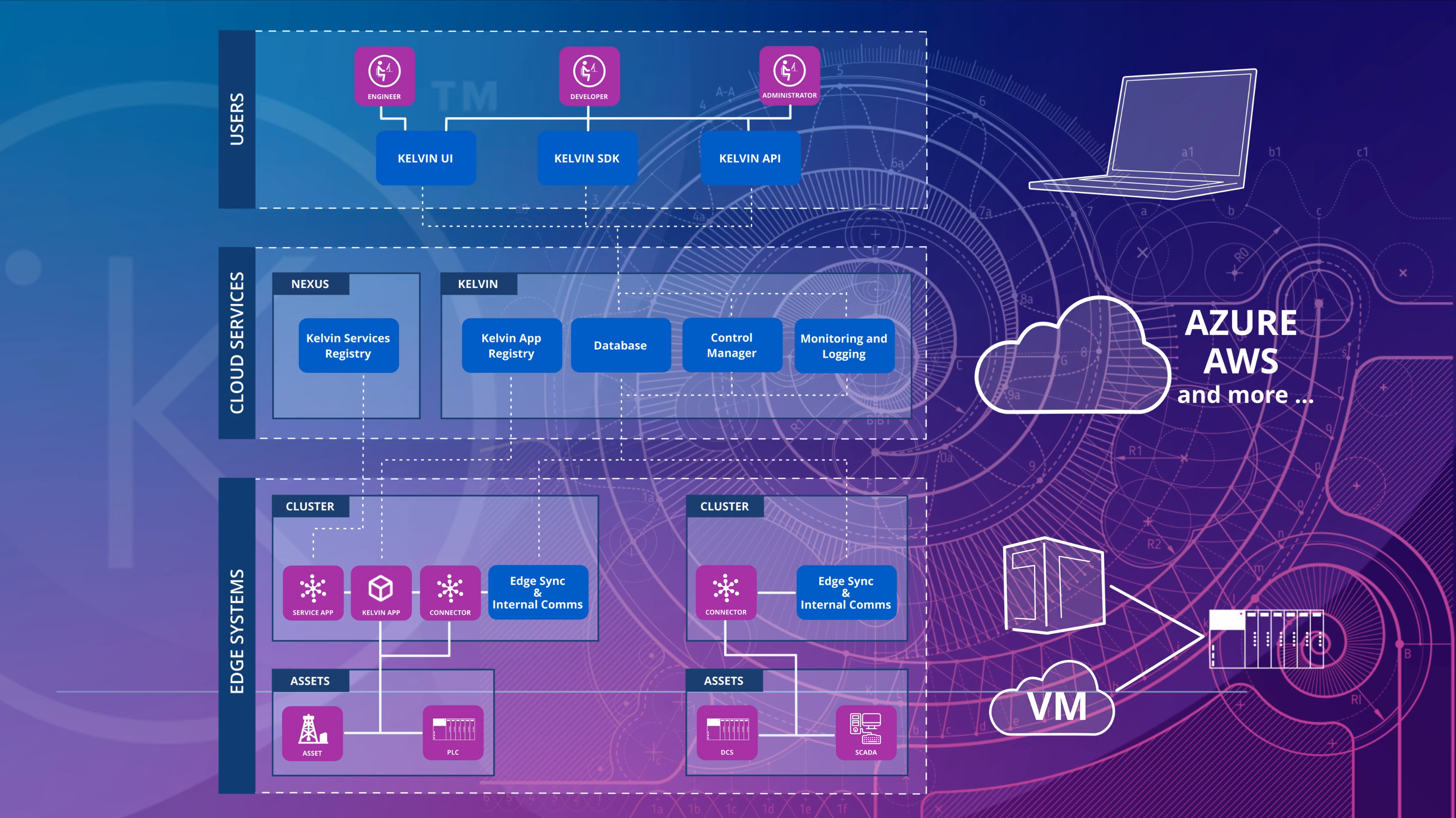
Edge computers can be physical machines near assets, virtual machines on local or cloud servers, or cloud-based PaaS instances. You can read more about possible setup architectures here.
This guide is essential for administrators working in tightly controlled network environments with strict firewall policies. It provides clear guidance on which ports and services must be accessible during installation versus ongoing operations.
The requirements in this section apply only to users deploying on physical hardware or virtual machines.
If you are using a managed cloud PaaS solution like EKS, AKS, or GKE, these infrastructure-level requirements are handled transparently by the cloud provider.
Quick Links
- What firewall ports do I need to open for initial installation?
- What firewall ports must remain open after installation?
- What are the minimum hardware requirements?
- What operating systems are supported?
- How should I configure my network?
- What cluster setup options are available?
Initial Installation Requirements
These requirements apply when you are first installing the Kelvin cluster. After successful installation, you can close these ports except for those listed in Operational Requirements.
Important for Secure Network Environments
If you work in a closed LAN environment with strict firewall policies, you will need to temporarily open these ports and domains during cluster installation.
Once installation is complete, you can close all of these except the ports listed in the Operational Requirements section.
Firewall Requirements for Installation
Configure your firewall to allow outbound connections to the following services during cluster installation:
| Service / Domain | Port | Protocol | Purpose |
|---|---|---|---|
| nexus.kelvininc.com | 443 | HTTPS | Download Kelvin cluster components and container images |
| registry.kelvin.ai | 443 | HTTPS | Download Kelvin cluster components and container images (Will replace nexus in future, no fixed plan at the moment) |
| docker.io | 443 | HTTPS | Download container images from Docker Hub |
| get.k3s.io | 443 | HTTPS | Download K3s installation script (for K3s clusters only) |
| archive.ubuntu.com | 80, 443 | HTTP/HTTPS | Ubuntu package repository access |
| security.ubuntu.com | 80, 443 | HTTP/HTTPS | Ubuntu security updates |
| www.google.com | 80, 443 | HTTP/HTTPS | Backup check if edge has access to the Internet if it can not access url http://archive.ubuntu.com |
| Your Platform URL | 443, 5000 | HTTPS | Communications to your Kelvin Platform |
After Installation
Once your cluster is successfully provisioned and registered with the Kelvin Platform, you can close access to:
docker.ioget.k3s.ioarchive.ubuntu.comsecurity.ubuntu.com
Only nexus.kelvininc.com:443, registry.kelvin.ai:443 and needs to remain open for ongoing cluster operations (see Operational Requirements).
Operational Requirements
These requirements must be met continuously while the cluster is running. These ports and services must remain accessible.
Communication Ports
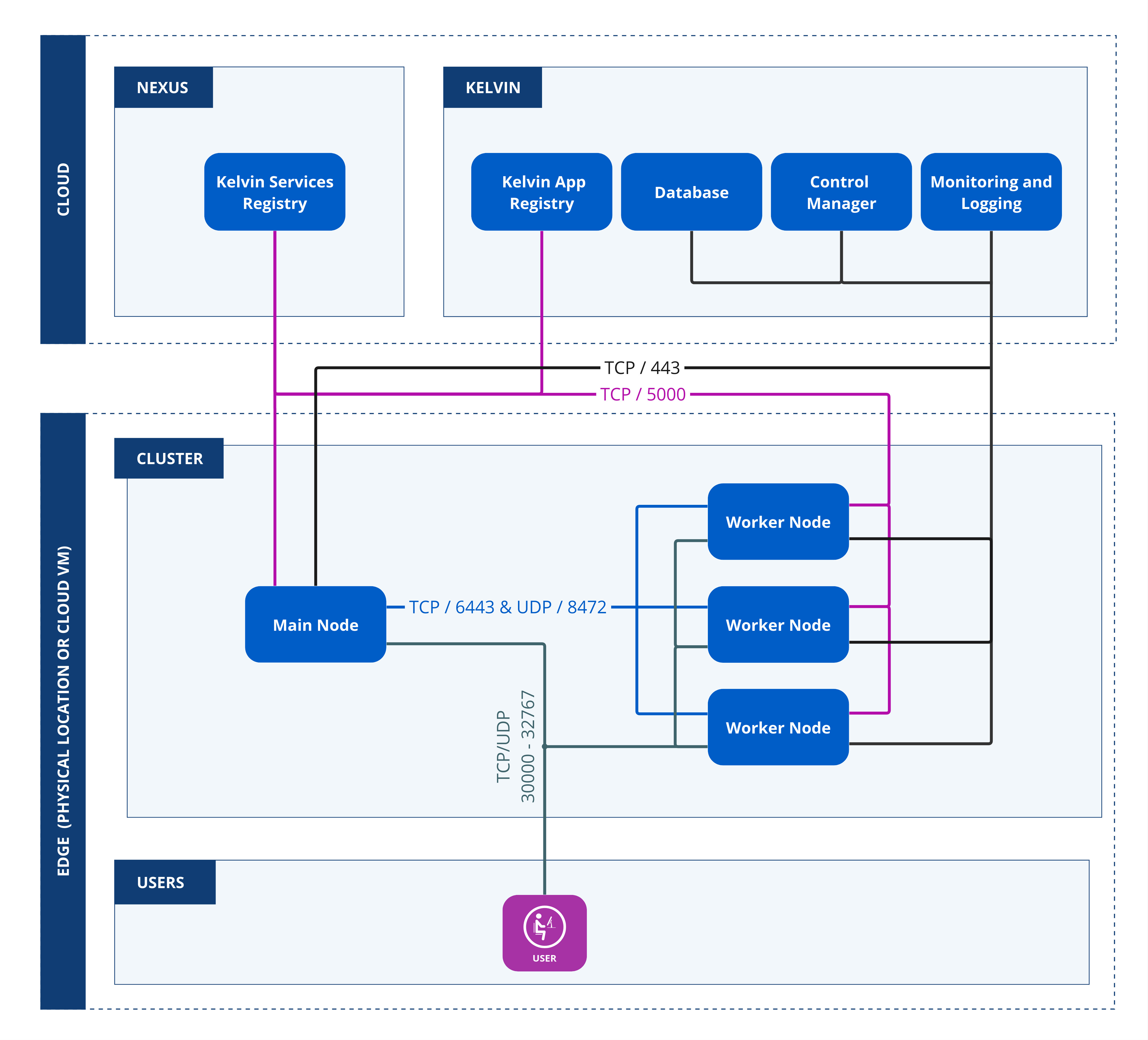
The following ports must remain open in your firewall for your cluster to communicate with the Kelvin Platform and your Assets.
Firewall Configuration Best Practice
Ensure your firewall is stateful (so return packets are automatically permitted).
If your firewall is stateless, add inbound rules permitting ESTABLISHED/RELATED TCP traffic back to the specified ports.
Rule Placement
In your firewall, make sure you place these allow rules before any general "deny" rules.
Cloud Communication
Your cluster needs to maintain communication with the Kelvin Platform/Nexus:
Note
These communication ports need to be open for all nodes in the cluster.
| Service / Domain | Port | Protocol | Purpose |
|---|---|---|---|
| Your Platform URL | 443, 5000 | HTTPS | Continuous communications with your Kelvin Platform |
| nexus.kelvininc.com | 443 | HTTPS | Ongoing communication with Kelvin Platform for downloading (pulling) Kelvin service images. |
| registry.kelvin.ai | 443 | TCP | Kelvin Platform private registry for pulling application images when new workloads are deployed. |
Cluster Internal Communication
For multi-node clusters, the following ports are required for inter-node communication:
Single Node Deployments
If you are using a Docker single node solution, you can skip this section. These ports are only required for multi-node Kubernetes/K3s clusters.
| Description | Port Type | Port No. | Comments |
|---|---|---|---|
| Main Node / Server Node | TCP | 443, 5000, 6443 | Required on the main/server node for cluster management and container registry |
| Worker Nodes | TCP | 443, 5000 | Required on all worker nodes for cluster communication |
| Worker Nodes | UDP | 8472 | Required for overlay networking (Flannel VXLAN) between worker nodes |
Application Services (Optional)
These ports are only needed if you deploy Applications with local services that need to be accessed from your network:
| Description | Port Type | Port No. | When Required |
|---|---|---|---|
| Application Services | TCP/UDP | 30000 - 32767 | Only open these ports if local services are deployed from Applications and require local network access |
Asset Communication Ports
If you communicate via Ethernet to your Assets (such as using Modbus TCP or OPC-UA), you will need to refer to your Asset's documentation to determine which ports must be opened:
| Description | Port Type | Port No. | Comments |
|---|---|---|---|
| Asset Related Communications | TCP/UDP | Vendor Specific | Refer to your Asset's manual for the specific ports used. Common examples: Modbus TCP (502), OPC-UA (4840), etc. |
Network Requirements
This section covers network configuration requirements for your cluster.
Static IP Address for Main Node
If you plan to use a Kubernetes or K3s solution and will set up a cluster with multiple nodes, the Main Node must have a static IP address.
Future Scalability
Even if you start with only one node but may need future scaling options, ensure the Main Node has a static IP address from the beginning.
Hardware Requirements
This section covers the minimum hardware specifications for running Kelvin clusters.
Resource Planning
Actual CPU and RAM requirements will depend heavily on:
- The number of Applications you want to deploy
- The resource intensity of those Applications
- The quantity of Assets you are monitoring
Resource-hungry apps or deploying tens or hundreds of Applications will require more resources than the minimums listed below.
Storage Recommendation
In all cases, SSD disks are strongly recommended for optimal performance.
Kubernetes Physical Nodes
For physical machines running Kubernetes:
ARM64 Processor Compatibility
If you plan to buy hardware with arm64 processors, check first with Kelvin to ensure the Connection you want to use to collect data from your Assets is compiled for the arm64 processor.
All Connections are compatible with x86_64 processors.
| Processor | Min CPU Cores | Min RAM | Min HDD |
|---|---|---|---|
| x86_64 | 2 | 4 GB | 25 GB |
| arm64 | 2 | 2 GB | 25 GB |
Kubernetes Virtual Machines
For virtual machine deployments, size your VMs according to your expected workload:
| Deployment Size | No of Nodes | Min VCPUs | Min RAM |
|---|---|---|---|
| Small | 1 - 10 | 2 | 4 GB |
| Medium | 10 - 100 | 4 | 8 GB |
| Large | 100 - 250 | 8 | 16 GB |
Docker Physical Nodes
For physical machines running Docker (single-node deployments):
ARM64 Processor Compatibility
If you plan to buy hardware with arm64 processors, check first with Kelvin to ensure the Connection you want to use to collect data from your Assets is compiled for the arm64 processor.
All Connections are compatible with x86_64 processors.
| Processor | Min CPU Cores | Min RAM | Min HDD |
|---|---|---|---|
| x86_64 | 2 | 2 GB | 20 GB |
| arm64 | 2 | 1 GB | 16 GB |
Docker Platform Support
You can see the supported platforms and limitations at the Docker website here.
Operating System Requirements
This section covers supported operating systems for physical hardware and virtual machine deployments.
Recommended: Ubuntu Server
If you are installing the Kelvin Edge onto physical hardware or a virtual machine, we strongly recommend using Ubuntu Server as your operating system.
Ubuntu LTS Versions
All our software is tested on the LTS (Long Term Support) releases of Ubuntu Server.
We recommend using Ubuntu Server version 22.04 or newer.
Other Operating Systems
Technically, you can install on any operating system that fully supports Kubernetes or Docker. However:
Compatibility Considerations
When using operating systems other than Ubuntu Server, you may find some Applications do not fully run as expected, especially if your Application:
- Runs in
privilegedmode - Utilizes additional hardware resources such as a GPU
- Requires specific kernel features
Cluster Setup Options
This section explains the different ways you can deploy and manage your Kelvin edge cluster.
Kelvin Platform is built on Kubernetes, providing a secure and scalable infrastructure. It supports various Kubernetes flavors and deployment options to match your operational needs.
Supported Infrastructure Options
Self-Managed Kubernetes Flavors:
- Kubernetes (standard)
- K3s (lightweight Kubernetes)
- Other Kubernetes-compatible distributions
Cloud PaaS Kubernetes Services:
- AKS – Azure Kubernetes Service
- EKS – Amazon Elastic Kubernetes Service
- GKE – Google Kubernetes Engine
Kelvin Managed Solutions
Choose these options if you want Kelvin to handle all cluster installation, maintenance, and upgrades automatically.
If you do not have Kubernetes experience or do not want to spend effort managing your own Kubernetes clusters, Kelvin can fully manage your cluster for you.
Zero Kubernetes Knowledge Required
With Kelvin-managed solutions, you only need to provide a Linux system (minimum Ubuntu 22.04). Kelvin handles everything else automatically—from installation and setup to ongoing maintenance and upgrades.
Kelvin offers two fully managed solutions:
| Option | Best For | Key Advantages |
|---|---|---|
| K3s | Production environments requiring scalability | Full Kubernetes solution, scalable across multiple nodes, automated cluster management |
| Docker | Single-node deployments on low-resource devices | Lightweight, simple installation, minimal resource requirements |
K3s - Managed Kubernetes Cluster
Select K3s from the Kelvin UI when creating your cluster.
No Kubernetes Knowledge Required
Just provide a Linux system (minimum Ubuntu 22.04). Kelvin handles the rest.
Key Features:
- Full Kubernetes solution with multi-node support
- Automatic installation and configuration
- Managed upgrades and maintenance
- Scalable from single node to multiple nodes
Technical Specifications:
- Max 110 pods per node
- 16 pods reserved per cluster for core system Applications
- Core services consume 2 GB storage space
- Pod CIDR:
10.42.0.0/16 - Service CIDR:
10.43.0.0/24
How to Set Up:
Refer to Provision a K3s Cluster for step-by-step setup instructions.
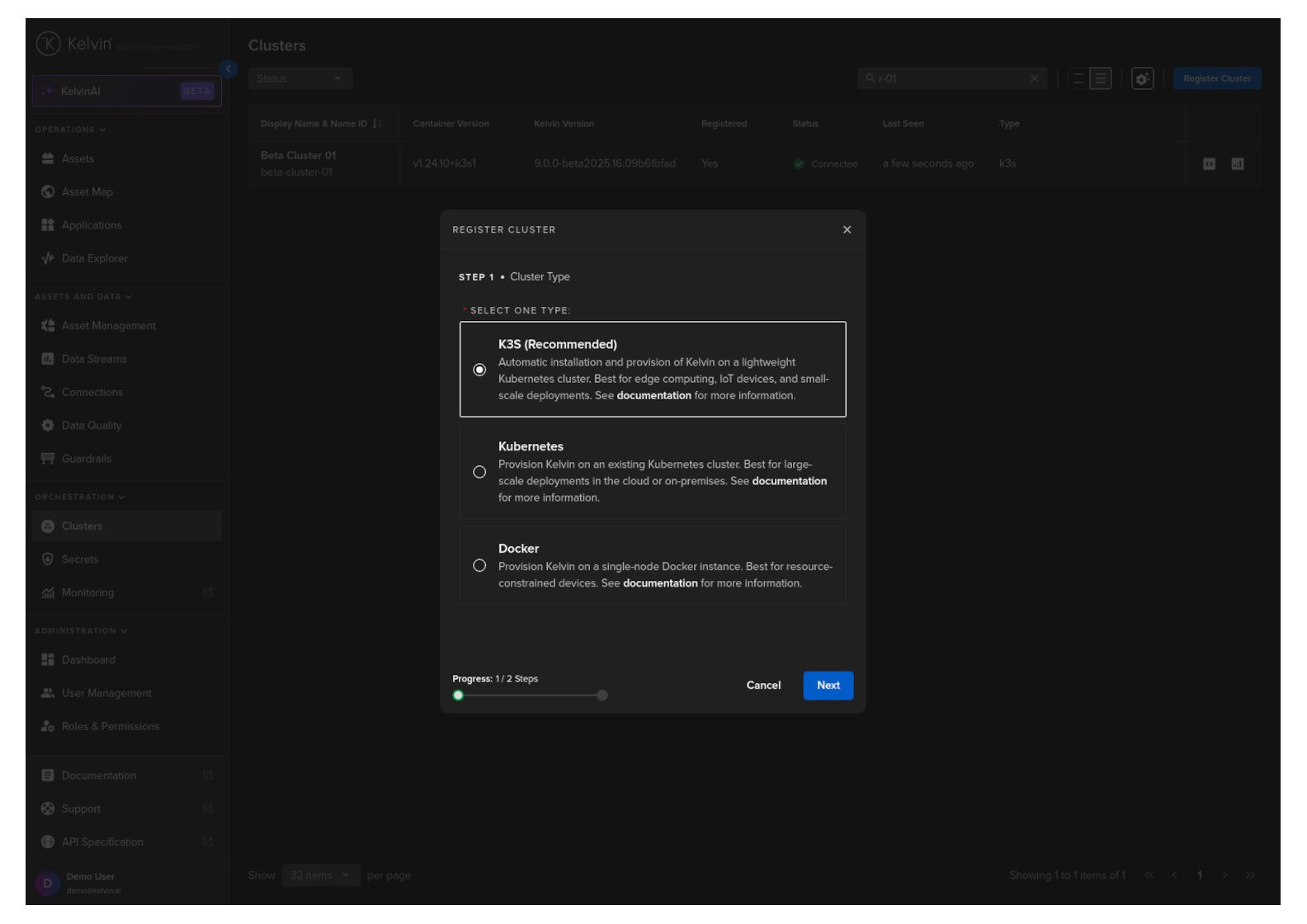
Figure: Creating a new K3s cluster in the Kelvin UI
Docker - Managed Single Node
Select Docker from the Kelvin UI when creating your cluster.
No Docker Knowledge Required
Just provide a Linux system (minimum Ubuntu 22.04) with Docker preinstalled.
Kelvin handles the rest.
Key Features:
- Lightweight single-node installation
- Ideal for low-resource edge devices
- Simplified management
- Automatic setup and maintenance
Best Use Cases:
- Edge devices with limited resources
- Single-asset monitoring scenarios
- IoT gateway deployments
- Development and testing environments
How to Set Up:
Refer to Provision Docker Cluster for step-by-step setup instructions.
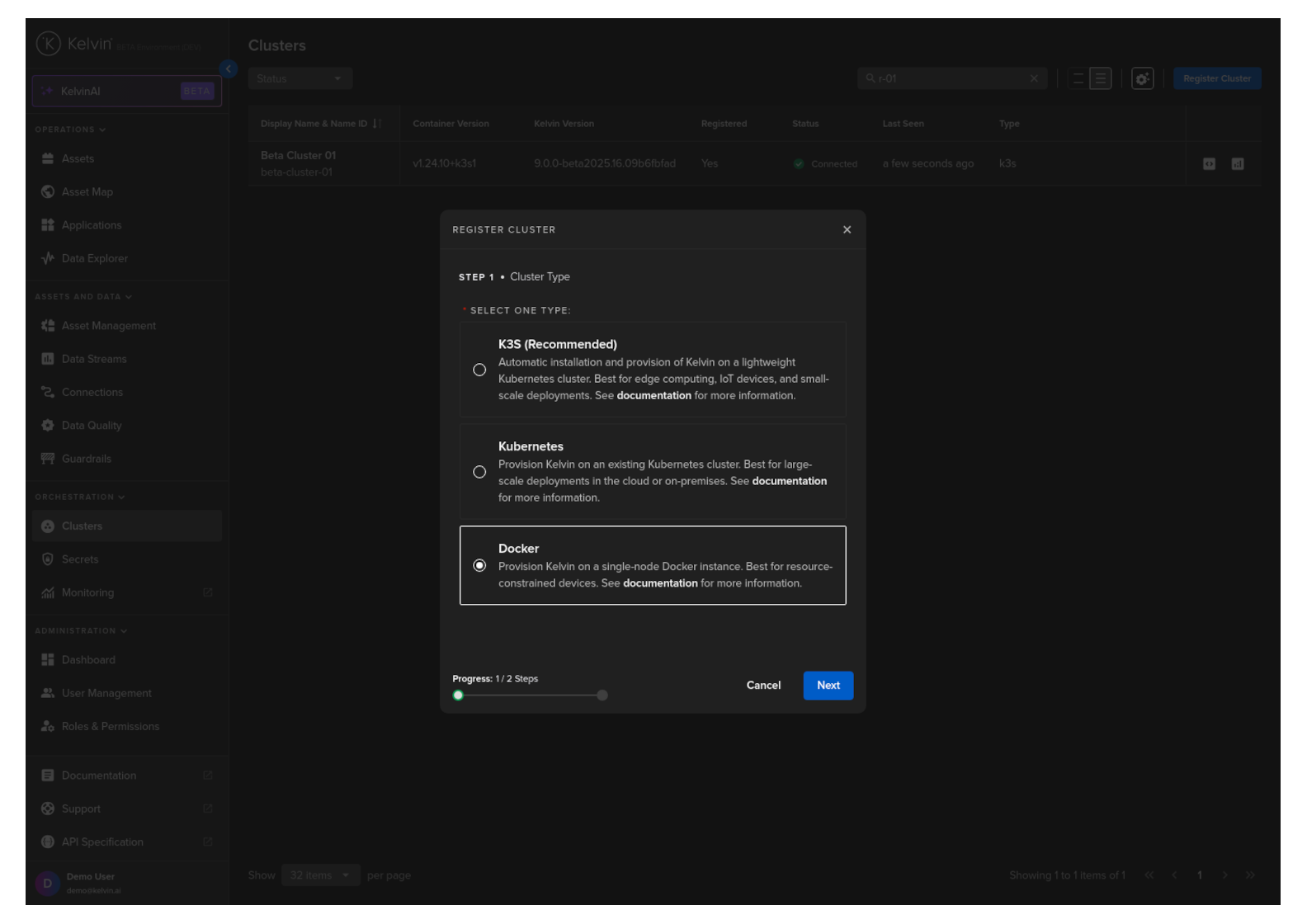
Figure: Creating a new Docker cluster in the Kelvin UI
Self-Managed Solutions
Choose these options if you want to manage your own Kubernetes infrastructure.
If you already run your own Kubernetes infrastructure or prefer full control over your cluster configuration, you can choose a self-managed option.
Cluster Type Selection
Only select K3s in the Kelvin UI if Kelvin is managing the cluster.
Use Kubernetes for self-managed K3s or any other self-managed Kubernetes distribution.
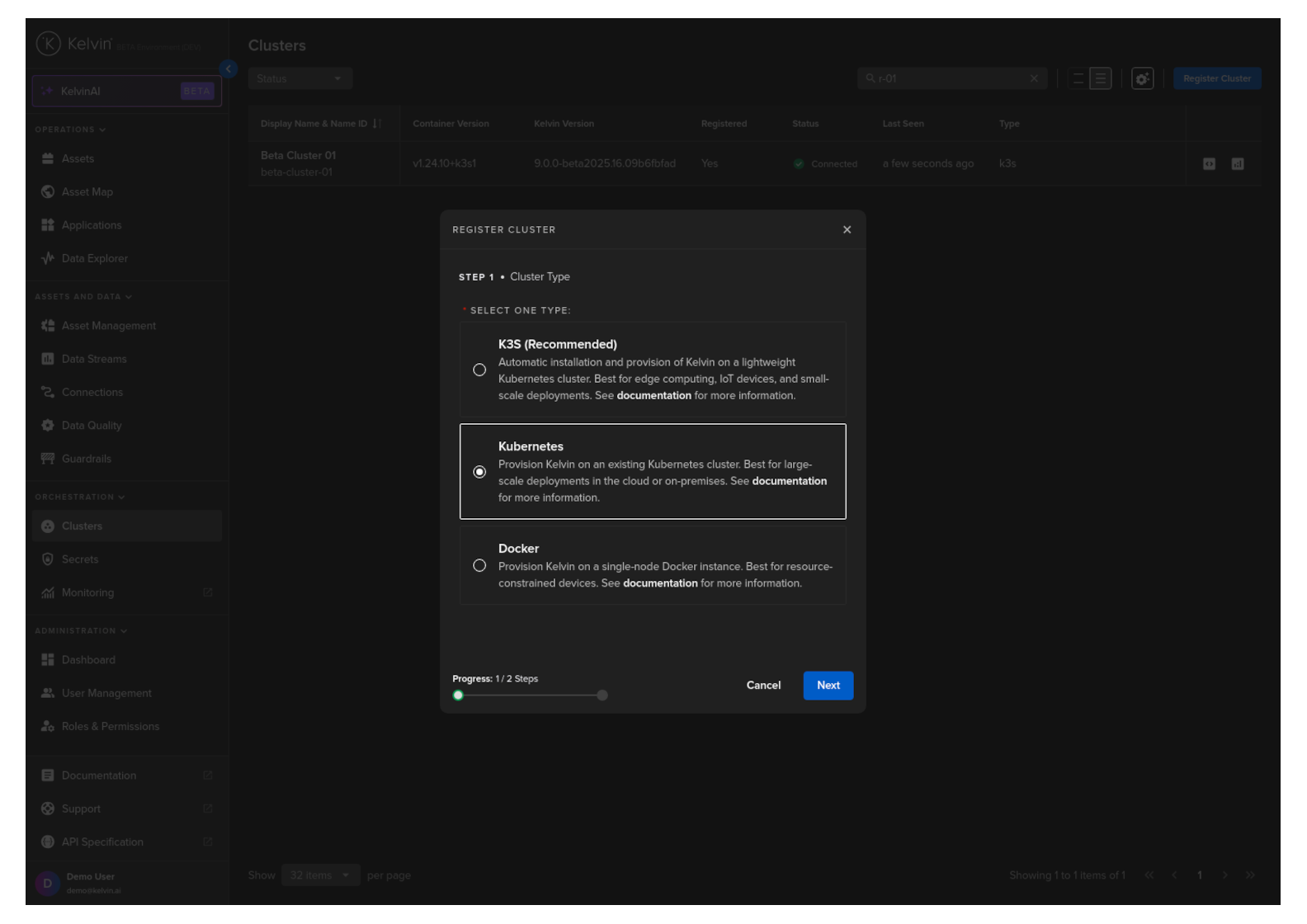
Figure: Creating a self-managed Kubernetes cluster in the Kelvin UI
Self-Managed Kubernetes (Physical/VM)
For generic open-source Kubernetes deployments on bare metal or virtual machines (local data center or cloud).
Your Responsibilities:
- Kubernetes installation and configuration
- Cluster maintenance and upgrades
- Resource sizing and capacity planning
- High availability and disaster recovery
Useful Resources:
Self-Managed K3s (Physical/VM)
For users managing their own K3s setup on low-resource devices or virtual machines.
Your Responsibilities:
- K3s installation and configuration
- Cluster maintenance and upgrades
- Node management
Useful Resources:
Amazon EKS (Cloud)
Use this option to run your Kubernetes cluster in AWS using Amazon EKS.
What Kelvin Does
Kelvin will deploy core services into your managed EKS cluster.
Your Responsibilities:
- EKS cluster setup and configuration
- Resource sizing and instance type selection
- Operational costs and billing optimization
- AWS service quotas and regional availability
Useful Resources:
- Choosing an AWS Container Service
- Getting Started with AWS Batch on Amazon EKS
- Amazon EKS Service Quotas
- Choosing an Amazon EC2 Instance Type
- Amazon EKS Pricing
Microsoft AKS (Cloud)
Use this option to run your Kubernetes cluster in Azure using Microsoft AKS.
What Kelvin Does
Kelvin will deploy core services into your managed AKS cluster.
Your Responsibilities:
- AKS cluster setup and configuration
- Service quotas and regional availability
- Billing optimization and cost management
- Azure-specific networking and security
Useful Resources:
- Kubernetes Core Concepts for Azure Kubernetes Service
- Azure Well-Architected Framework Review
- Quotas, Virtual Machine Size Restrictions, and Region Availability
- Azure Kubernetes Service (AKS) Architecture Design
- Optimize Costs in Azure Kubernetes Service
Google GKE (Cloud)
Use this option to run your Kubernetes cluster in Google Cloud using GKE.
What Kelvin Does
Kelvin will deploy core services into your managed GKE cluster.
Your Responsibilities:
- GKE cluster setup and configuration
- Resource sizing and machine type selection
- Cost optimization and quota management
- Google Cloud-specific networking and security
Documentation Available
Detailed GKE integration documentation will be added in future updates. Please contact Kelvin support for current guidance on GKE deployments.