Asset
What is an Asset?
An Asset in Kelvin denotes a digital representation of a physical or virtual equipment. Each asset is characterized by a set of properties that detail its attributes and by datastreams, which are channels of continuous or time-stamped data related to the asset's operation or state. Through these properties and datastreams, Kelvin enables users to closely monitor, simulate, and analyze the performance of the asset.
In most cases your assets will be located where your machinery is located. They will be connected to Kelvin through a gateway device (Cluster) that will be responsible for collecting data from the asset and sending it to Kelvin.
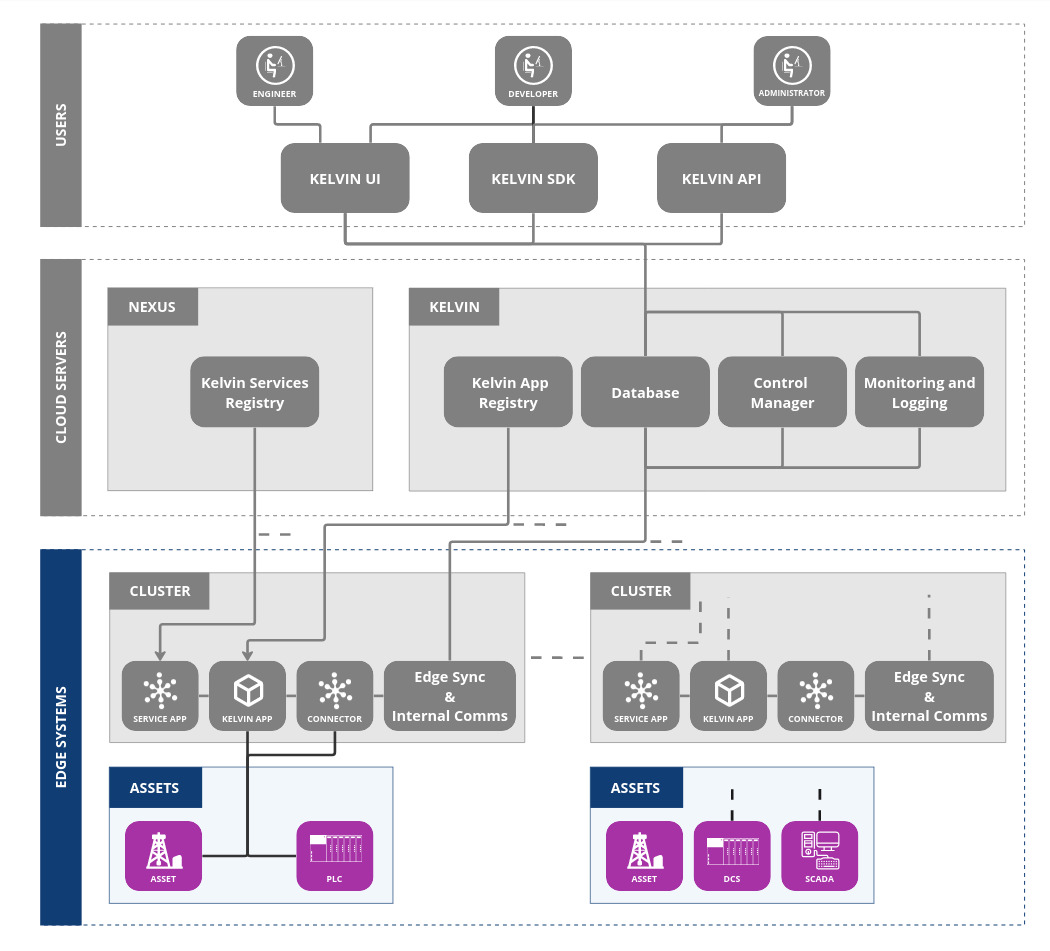
Asset & Associated Data Streams
An asset represents any entity in an industrial environment that you wish to monitor or derive data from.
-
Physical Assets: These are tangible pieces of equipment or systems present in the field. Examples include pumps, motors, sensors, and other machinery.
-
Virtual Assets: These are intangible or software-defined entities that might represent processes, aggregated data points, or virtual representations of physical systems. For instance, a "virtual asset" could be a software representation of an entire production line, combining data from multiple physical sensors and devices.
Each Asset is linked to one or more Data Streams.
A Data Stream in Kelvin refers to a continuous flow of data related to a specific aspect of an Asset. It captures and channels time-stamped or real-time information, enabling users to monitor, analyze, and derive insights from the Asset's behavior, performance, and state. Data Streams are obtained from sensors, meters, historians, DCS, PLC and other data sources (like Applications or APIs).
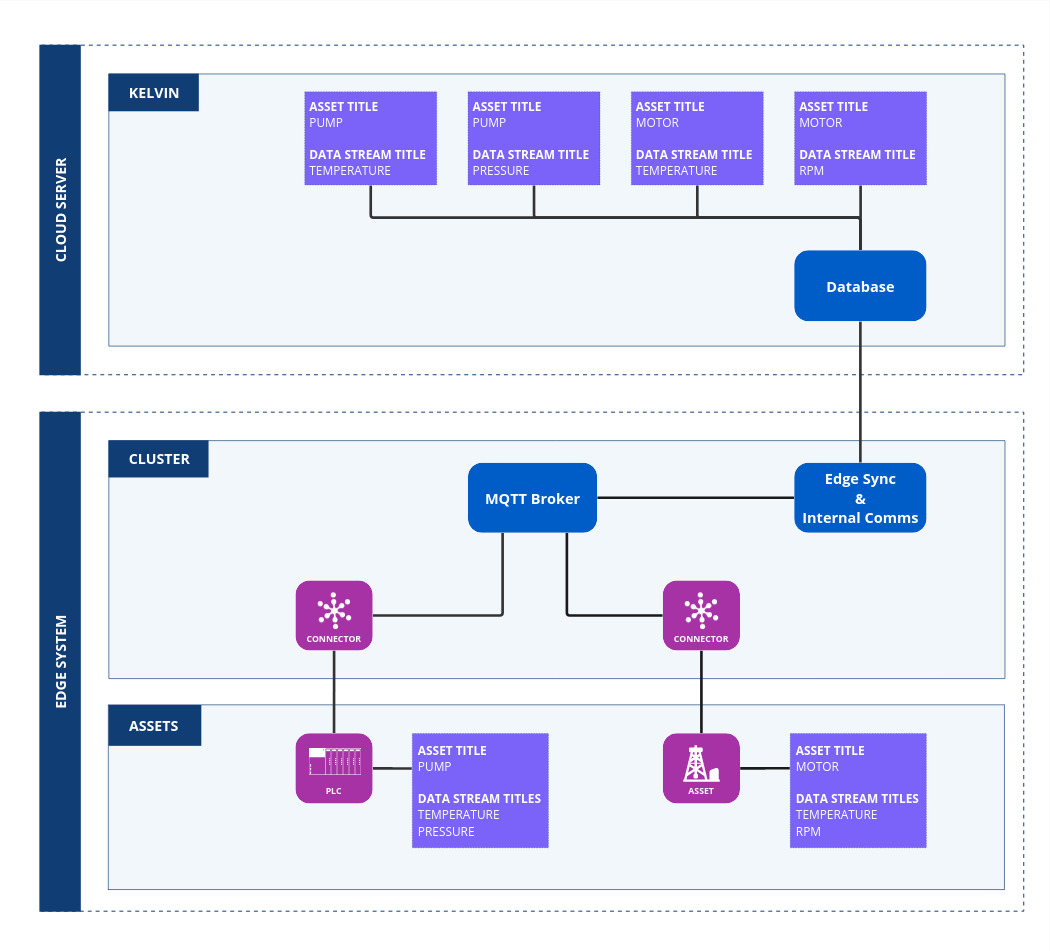
For example:
- Pump (Asset):
- Temperature (Data Stream): This stream monitors the operating temperature of the pump, capturing data in real-time or at set intervals.
- Pressure (Data Stream): This stream measures the pressure of the fluid being pumped, again possibly in real-time or at defined intervals.
- Motor (Asset):
- Temperature (Data Stream): Monitors the operating temperature of the motor.
- Speed (Data Stream): Captures data on the RPM speed at which the motor is running.
- Production Process (Virtual Asset):
- Efficiency (Data Stream): This could be a virtual data stream that calculates efficiency by combining real-time data from multiple sensors or devices on a production line.
Every piece of data that is recorded is specifically associated with an Asset and a Data Stream. This pair ensures that there's a clear traceability and context for each data point.
For example, if a temperature reading of 75°C is recorded at a certain timestamp, it would be associated with a specific motor (Asset) and its temperature monitoring (Data Stream). This provides clarity on what the data represents and where it originated.
By defining data collection in terms of Assets and Data Streams, organizations can achieve a structured and organized approach to monitoring and analyzing their industrial environments, whether dealing with physical machinery or virtual representations of processes. It ensures that data is not only collected but is meaningful, contextual, and can be used for informed decision-making, predictive maintenance, and other data-driven Applications.
Reference
| Field | Description |
|---|---|
| Name | Unique name identifier. It must contain only lowercase alphanumeric characters. The characters ., _ and - are allowed to separate words instead of a space BUT can not be at the beginning or end of the name. |
| Title | The display name to show on the Kelvin UI. It can contain any characters, including spaces. |
| Asset Type | The name of the Asset Type that this Asset belongs to. This must be a valid Asset Type name. |
| Properties | A list of key/value pairs that define custom properties of the asset. Use this to define attributes like: Location, Site, PLC Type, Manufacturer, Serial Number, etc. |
| Entity Type | Deprecated. Entity type should always be asset. |
| Parent Name | Deprecated. Parent should always be null. |
| Hierarchy | Deprecated. Hierarchy should always be an empty list []. |
Name
The unique name of the asset. It must contain only lowercase alphanumeric characters.
The characters ., _ and - are allowed to separate words instead of a space BUT can not be at the beginning or end of the name.
The maximum length is 64 characters.
Title
The display name of the asset. It can contain any characters, including spaces.
This is used to identify the data stream in the Kelvin UI.
The maximum length is 64 characters.
Asset Type
An Asset Type refers to a specific categorization or classification of assets based on shared characteristics or functionalities. Asset Types are typically used to organize, manage, and track assets in a systematic manner, especially in industries where a variety of assets are employed for different purposes.
You need to create an Asset Type before you can create an Asset.
Examples of Asset Types:
| Asset Type |
|---|
| Beam Pump |
| Plunger Lift |
| Electrical Submersible Pump |
| Progressing Cavity Pump |
Properties
A list of key/value pairs that define custom properties of the asset. Use these properties to enrich the asset with additional information that can be used to filter assets in the Kelvin UI.
You can define any number of properties for an asset.
Examples of Properties:
| Property Name | Property Value |
|---|---|
| Location | Texas |
| Site | Houston |
| PLC Type | Allen Bradley |
| Manufacturer | GE |
| Serial Number | 123456789 |