Data quality
Overview
Data Streams can have automated validation checks enabled to monitor the quality of the data being received from the Asset.
These data quality validations are done at the edge in real time and any Application can subscribe to the results.
Note
The results are also saved to the Kelvin Cloud and will become available in future releases of Kelvin.
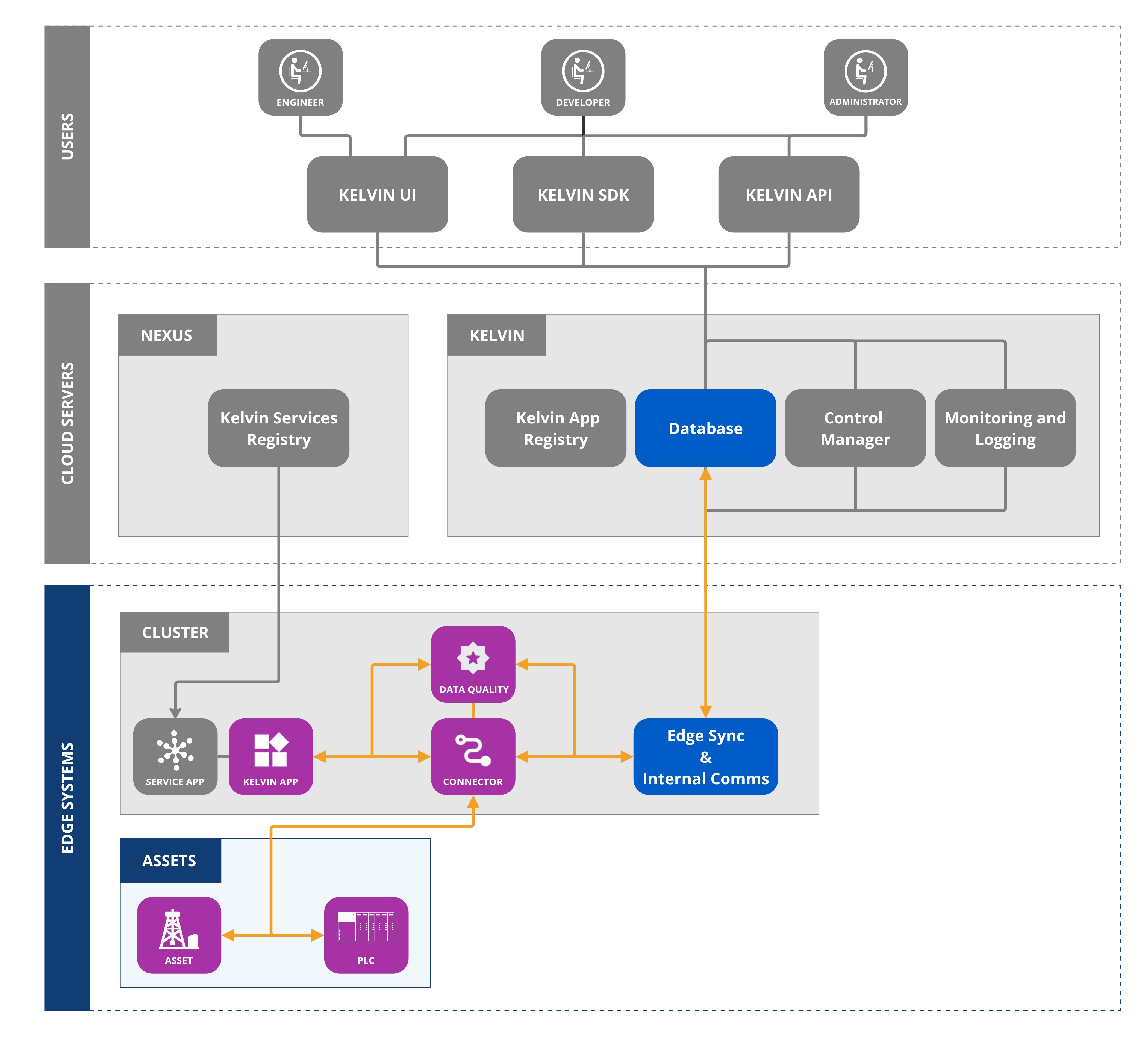
There are many types of data quality validation algorithms available to detect issues and maintain the integrity and reliability of data within the Kelvin Platform.
Data Quality Registration
Data Quality first needs to be registered.
Once registered, the selected data quality applications will monitor the data coming from the Asset/Data Stream pairs and output the results.
Note
Some Data Quality Applications will output regular reports, like Edge Data Availability, and others will only output reports when a problem is detected, like Outlier Detection.
Data Quality Inputs
Applications can subscribe selected Data Streams to run specific Data Quality validations.
Warning
You can subscribe to Asset/Data Streams for Data Quality validations which are not registered, but you will not receive any outputs as they are not being processed.
They can then see the validation's results in real time and react to any data quality issues. The type of reaction depends on the developer's requirements, for example sending emails or slack messages.
There are a number of inbuilt Data Quality validation options available.
| Validation | Description | Configurable Parameters |
|---|---|---|
| kelvin_timestamp_anomaly | Detects anomalies or irregularities in the timestamp sequence | None |
| kelvin_stale_detection | Detects when a Data Stream value has not changed over a configurable time window. Emits 1 when stale is detected, 0 when normal | window_interval, window_interval_unit (sec, min, hour, day) |
| kelvin_out_of_range_detection | Validates whether values fall within an expected range | min_threshold, max_threshold |
| kelvin_outlier_detection | Uses statistical methods to detect outliers over a moving window | model, threshold (default: 3), window_size (default: 10) |
| kelvin_data_availability | Ensures expected number of messages are received in a given time window | window_expected_number_msgs, window_time_interval_unit (second, minute, hour, day) |
All the validations are also saved in the Cloud and historical data will be accessible through the Kelvin UI in future releases.
Data Quality Outputs
It is also possible to create your own custom Data Quality Applications that will process and validate incoming Data Streams and then produce data quality information that can be used by other Applications.
The other Applications will connect to the custom validations through the Data Quality input key in the app.yaml and not directly to the Application doing the validation calculations.
All the validations are also saved in the Cloud and historical data will be accessible through the Kelvin UI in future releases.