Control Change
What is a Control Change?
A Control Change offers a robust mechanism to relay variable modifications to edge devices, such as PLCs or HMIs.
You can initiate Control Changes via:
- Direct interaction through the Kelvin UI
- Application
- Kelvin API
- Kelvin API Client (Python)
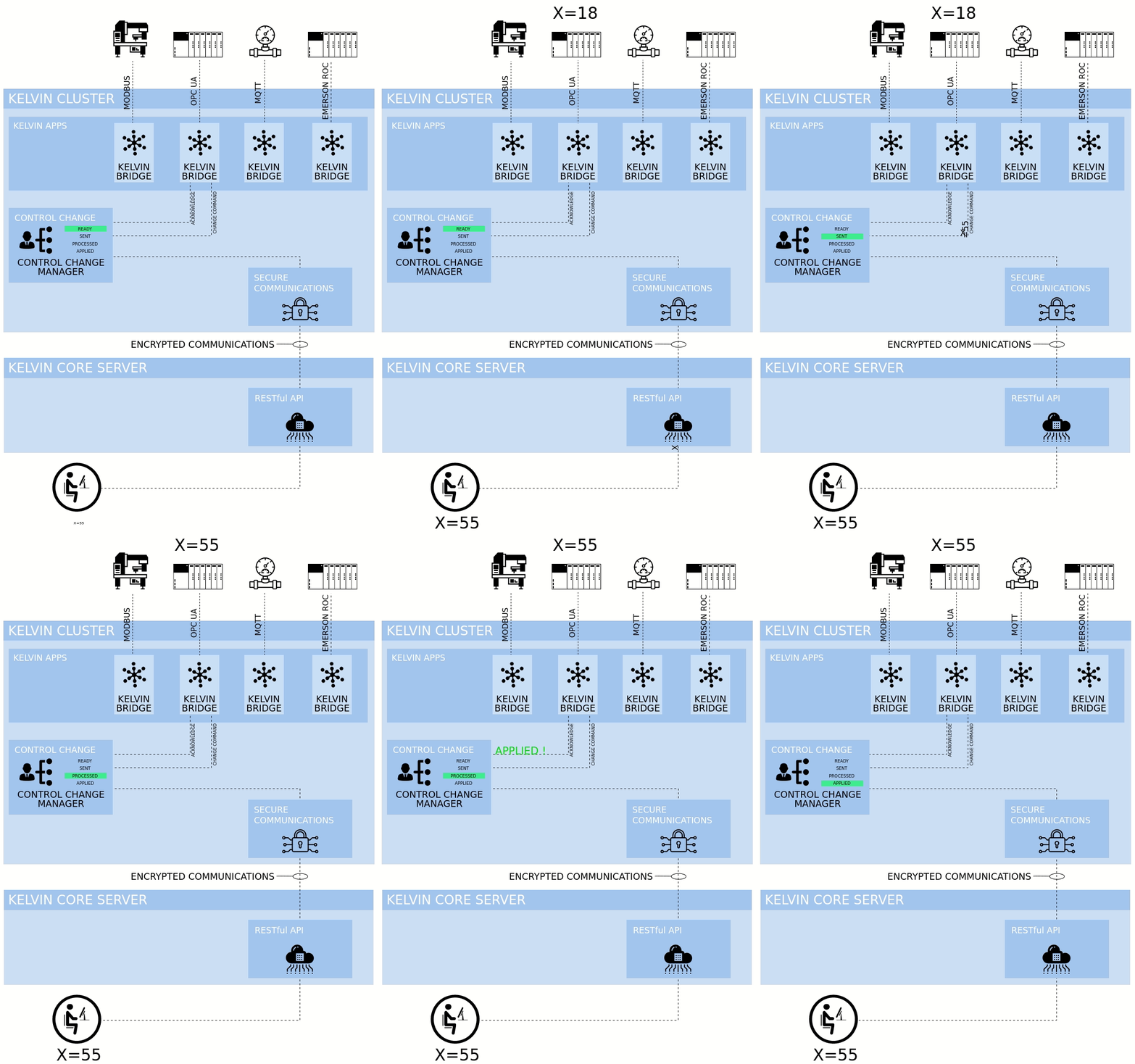
The process itself is explained in this infographic;
Note
Unlike the standard Read/Write data variable procedure, Control Change writes to the edge and leverages the edge-based Control Change Manager. This manager collaborates with Connections, ensuring successful write completion and verification.
Control Change Failures
The Control Change Manager is a powerful tool that uses multiple routines to help ensure values are successfully written to the Asset.
However, there are situations where writing to the Asset is not possible. A Control Change ends in one of the following states:
- Applied: the target value was confirmed as written to the Asset.
- Failed (explicit failure from Asset): the Asset returned an explicit failure response to a write attempt. The Connection relays this to the Control Change Manager, which immediately ends the Control Change as Failed, without waiting for the expiration date.
- Failed (guardrail violation): a Guardrail rule was violated before the write was attempted. The Control Change is rejected immediately.
- Failed (expired): the
expiration_datewas reached without an Applied confirmation.
Note
Exhausting the configured retry attempts does not abort the Control Change. After the last retry, the Control Change Manager continues waiting until the expiration_date is reached.
Success
The retry count and expiration date are configurable when the Control Change is created, either manually or through a Recommendation. If no value is given, the default values are used.
Parameter interplay
The retries count and the timeout (retry interval) parameter control the write cadence: how many times the Control Change Manager sends write requests to the Connection and how long it waits between each attempt.
The expiration_date alone controls the lifetime of the Control Change. It is evaluated independently of the retry count, so the two settings can be tuned separately.
Guardrail Failures
Before the Control Change Manager sends a request to the Connection, it validates the target value against any configured Guardrail rules. If a rule is violated, the Control Change is immediately marked as Failed and no write request is sent to the Asset.
Control Change Flow
Refer to the infographic below for a visual representation of the Control Change flow in detail:
Note
This infographic shows a general flow with a success path and only failures on timeout. See more about possible failures, see the previous section above.
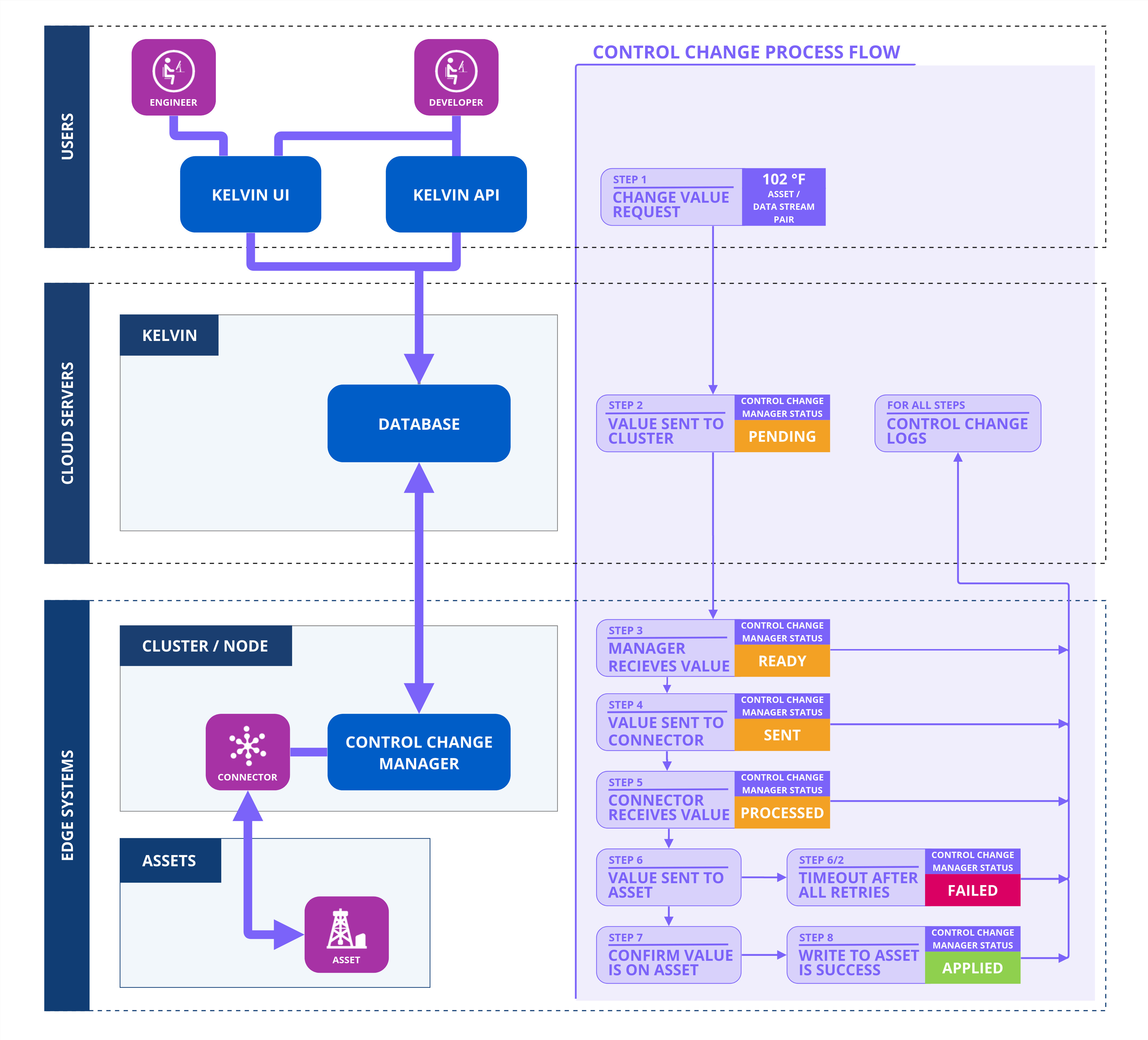
Let's follow the journey of a Control Change initiated by a user on a computer through an API call or using the Kelvin UI.
Value Change Request
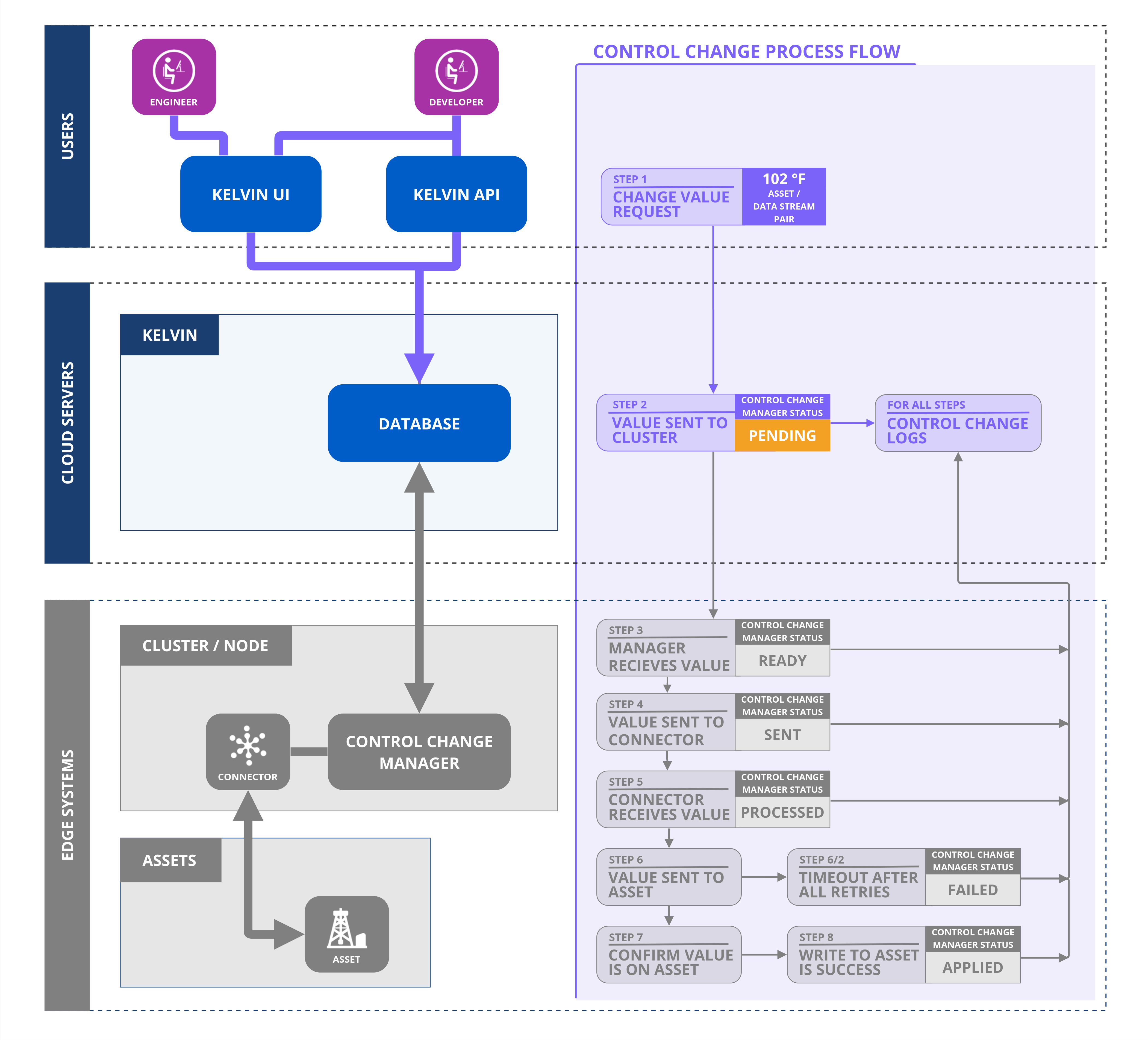
When a user initiates to change a value, a new Control Change request is created and the system assigns it a unique ID. This sets the Control Change initial status to "Pending." Subsequently, the Control Change is forwarded to the designated Cluster.
The status will be further updated based on feedback from the Control Change Manager within the Cluster regarding the progress of this request.
Ready (On the Cluster)
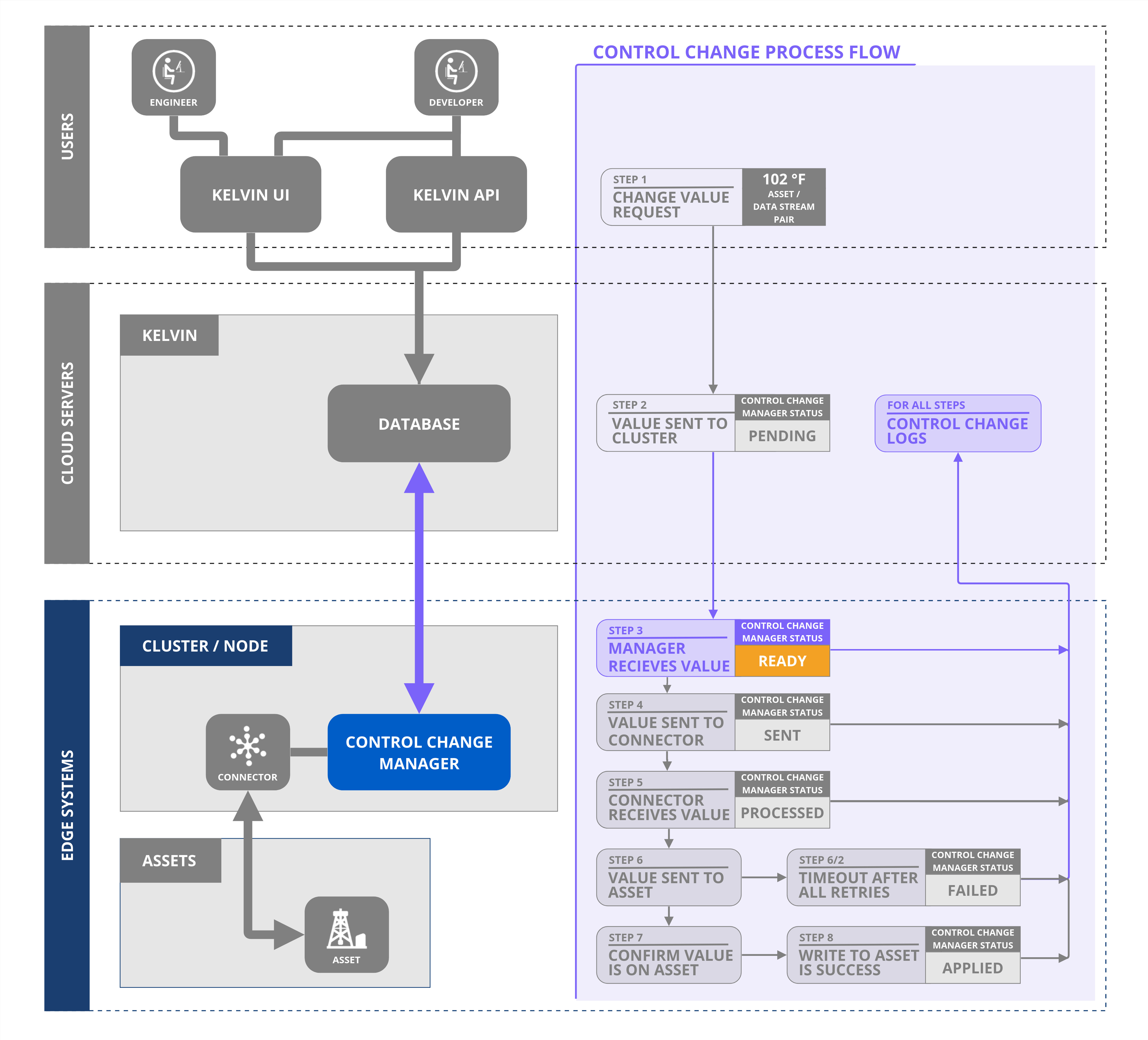
When the Control Change request is sent to the Kelvin Control Control Manager on the Cluster, the Control Change status is set as Ready.
Ready to Sent (On the Cluster)
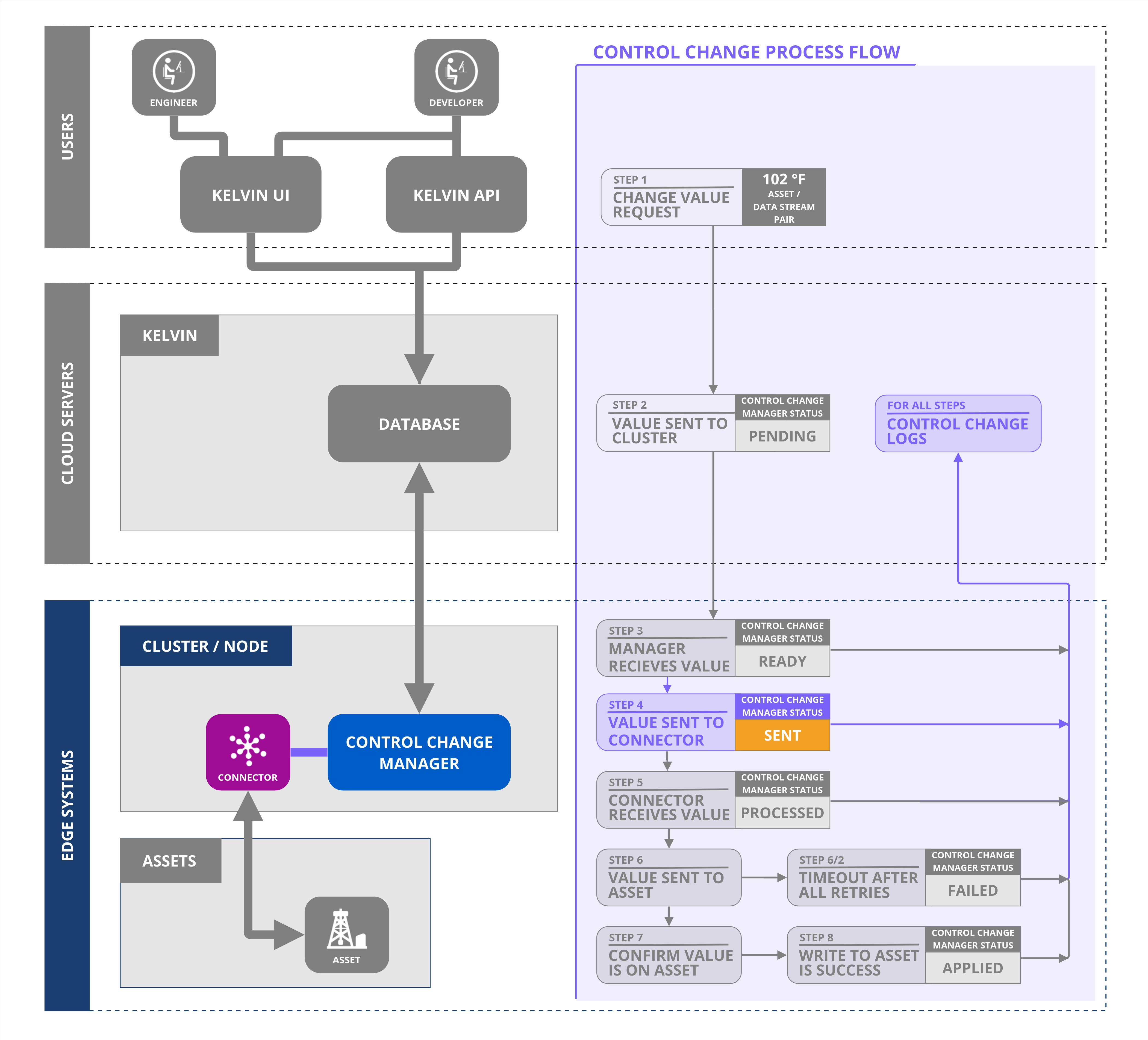
Upon dispatching the Control Change request to the designated Connection, the Control Change Manager updates the status to "Sent."
Sent to Processed (On the Cluster)
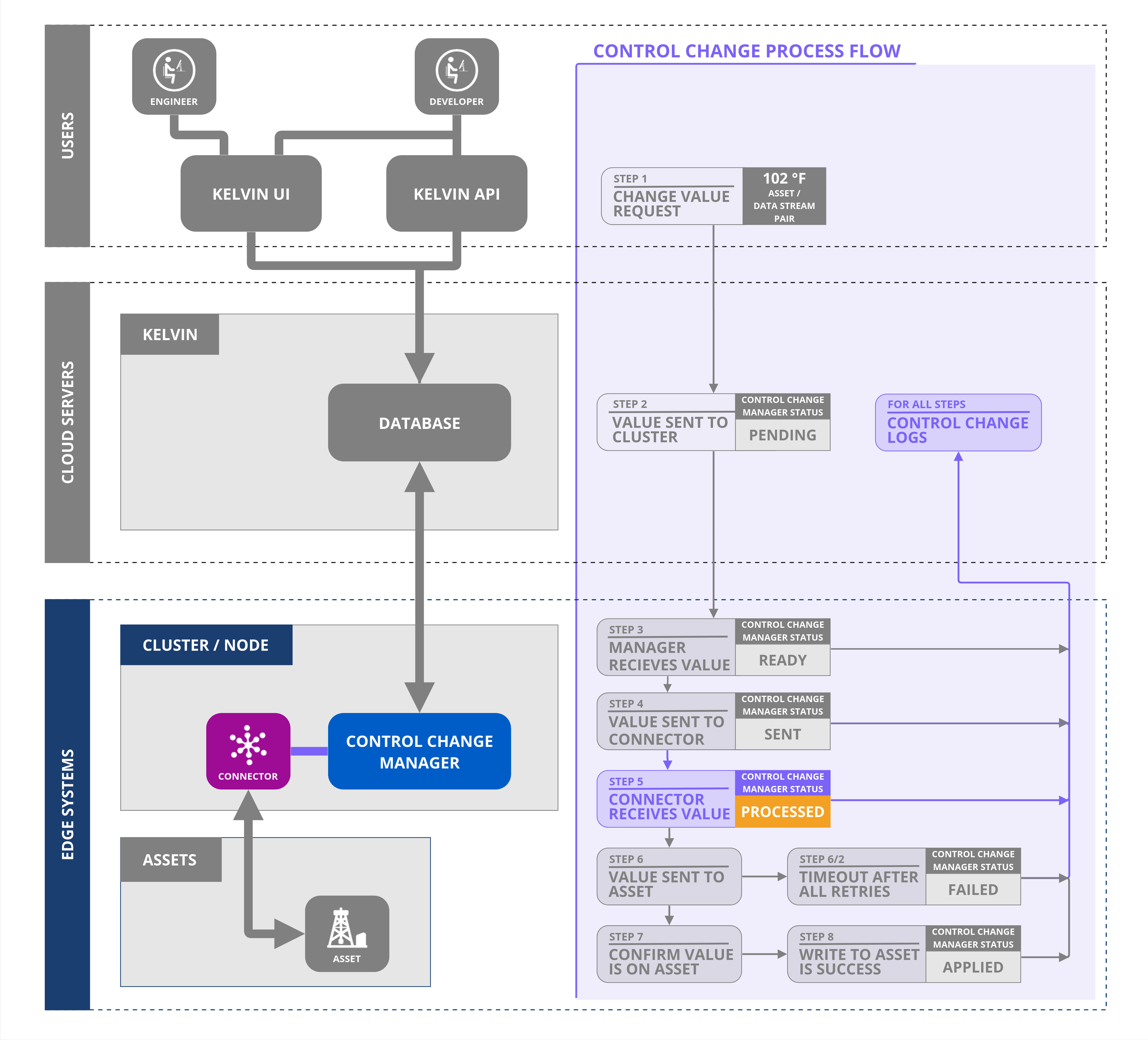
The Control Change Manager dispatches the write request to the Connection. The Connection writes the value to the Asset and sends a "Processed" acknowledgment back to the Control Change Manager, which then updates the status to "Processed."
Warning
"Processed" means the Connection received the write request from the Control Change Manager, sent the write to the Asset, and reported back. It does not confirm that the Asset accepted the write or that the new value has been persisted.
Processed to Applied (on the Cluster)
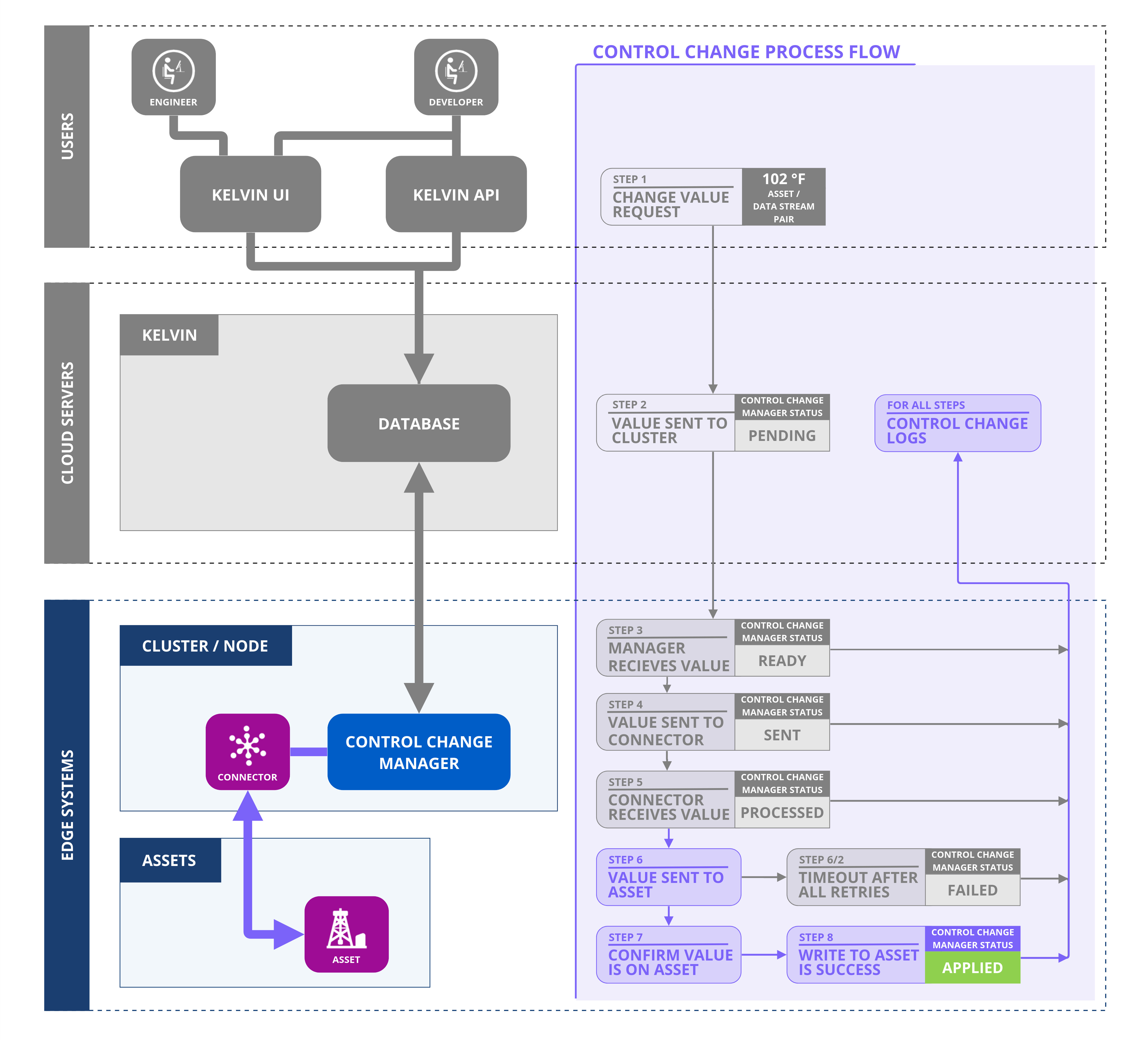
After receiving the Processed acknowledgment, the Control Change Manager continues retrying by sending additional write requests to the Connection, which writes to the Asset again. This continues at the configured timeout (retry interval), for up to the configured number of additional attempts.
The Connection independently monitors incoming data reads from the Asset. When a regular data update arrives and the read value matches the requested Control Change value, the Connection reports an "Applied" acknowledgment to the Control Change Manager, which updates the status to "Applied," marking the Control Change as complete. At this point, all further write requests, timers, and the expiration countdown stop immediately.
If no match is found on a read, the Connection continues monitoring until the expiration_date is reached.
Failure Cases
Sometimes Control Changes can not be applied to the end machine. Some reasons can be;
- Broken communications between the Kelvin API and the Cluster
- Connection Failure
- Bad settings on the Connection
- Broken communications between the Connection and the machine
- Guardrail rule violations
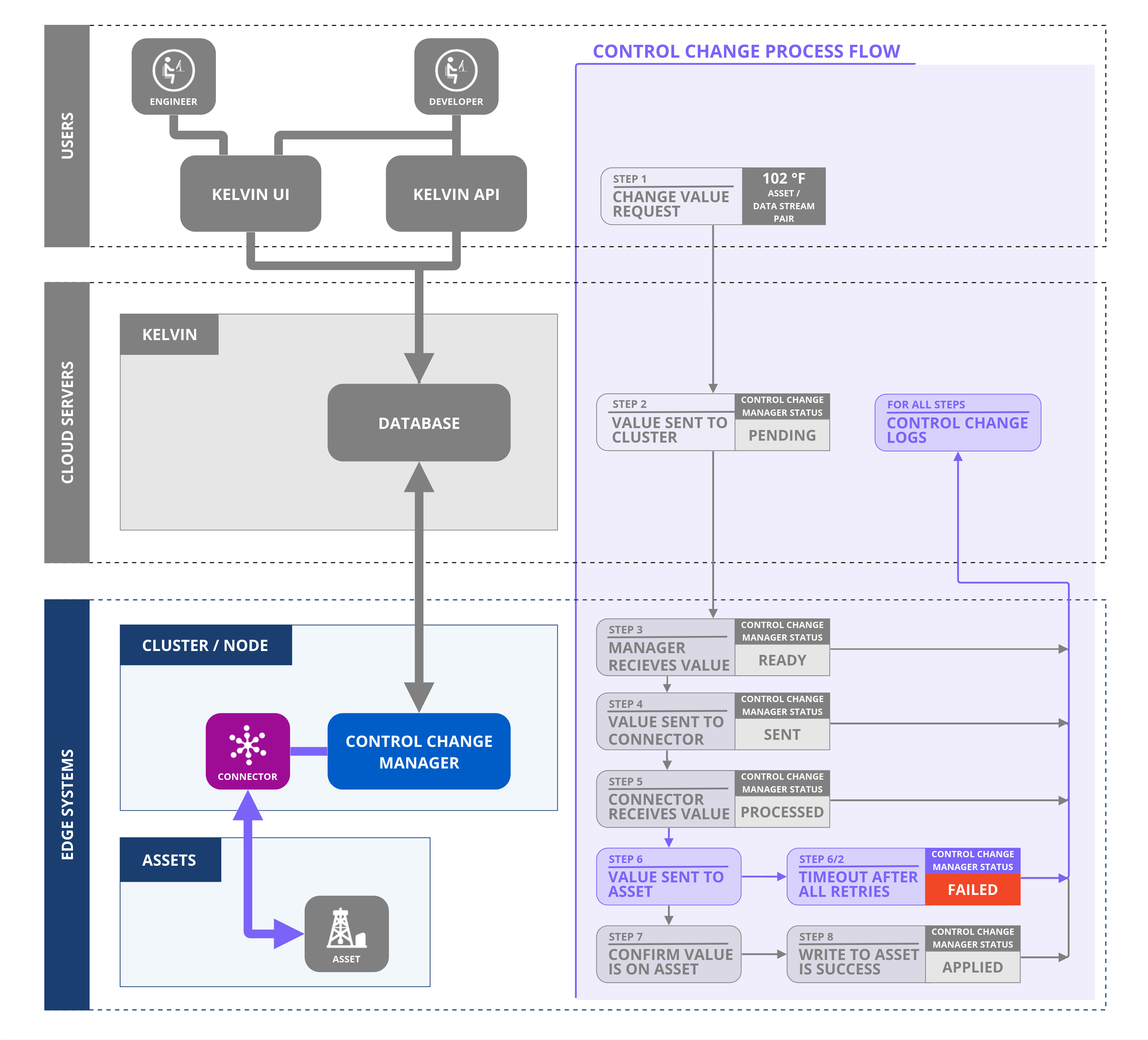
A Control Change reaches a Failed status in the following ways:
- Expiration date reached: the
expiration_datepassed without an Applied confirmation. - Explicit failure from the Asset: the Asset returned a failure response to a write attempt. This is a hard stop regardless of remaining retries or expiration date.
- Guardrail violation: the requested value violated a configured Guardrail rule.
Warning
Exhausting the retry count alone does not cause a Failed status. Once a Failed status is set, no further write attempts are made.
Write retries after Processed
After receiving the Processed acknowledgment, the Control Change Manager retries by sending additional write requests to the Connection at the configured timeout (retry interval), for up to the configured number of additional attempts (retries). The Connection writes to the Asset on each retry.
Exhausting all retries does not cause the Control Change to fail. The Control Change Manager stops sending write requests but the Control Change remains active. The Connection continues monitoring incoming reads for an Applied confirmation, until the expiration_date is reached.
Any Status to Failed - Explicit failure from Asset
If the Asset returns an explicit failure response to a write attempt, the Connection relays this to the Control Change Manager, which immediately updates the status to Failed.
Warning
This is a hard stop. The Control Change Manager immediately stops sending write requests to the Connection. The Control Change does not wait for the expiration_date. It ends as Failed right away, with the failure reason annotated on the Control Change object.
Any Status to Failed - Expiration
Both the Kelvin API and the Kelvin Control Change Manager will wait for an Applied response from the Connection until the expiration_date is reached.
The expiration_date is an absolute date and time, or a duration from when the Control Change was created, after which all pending attempts are canceled and the Control Change status is changed to Failed.
Guardrail Rule Violations
If a Guardrail rule is violated, the Control Change will not be executed and will be automatically marked as Failed. The reason will be annotated with the Control Change Object.
This means that the Asset will never receive a write request to update the Data Stream value.