Quick Start Course
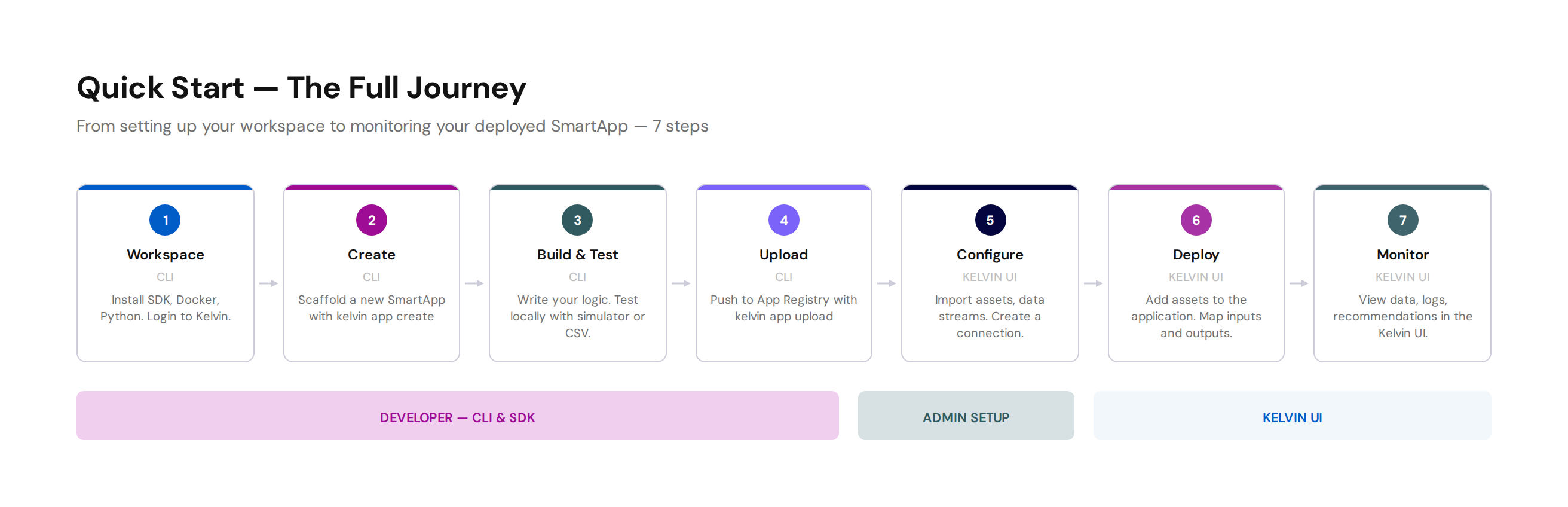
The Developer Quick Start is a structured, hands-on course that takes you from zero to a fully deployed Kelvin SmartApp™ in eight steps. It lives inside Kelvin Academy — our dedicated learning environment — so you can progress through it at your own pace and return to individual steps at any time.
New to Kelvin development?
This course is the best place to begin. No prior experience with Kelvin is required — just Python and a willingness to build something.
What You Will Build
By the end of the course you will have:
- A working Kelvin SmartApp™ running in a real cluster
- Hands-on experience with the Kelvin SDK, CLI and cloud UI
- A solid foundation for every How To Guide in this section
Course Steps
-
0. Introduction
Overview of the course and what to expect.
-
1. Your Workspace
Set up everything you need before writing a single line of code.
-
2. Create
Scaffold your first SmartApp using the Kelvin CLI.
-
3. Test
Run your SmartApp locally and validate it works as expected.
-
4. Upload
Publish your SmartApp to the Kelvin registry.
-
5. Configure
Prepare the cloud environment to receive your SmartApp.
-
6. Deploy
Deploy your SmartApp to a live cluster.
-
7. Monitor
Observe your running SmartApp — logs, telemetry and status.
-
8. Quiz
Test your knowledge before moving on.
About Kelvin Academy
All course content is maintained in Kelvin Academy, the central learning hub for the Kelvin platform. Courses are organised by role and difficulty, so you always know where to go next.